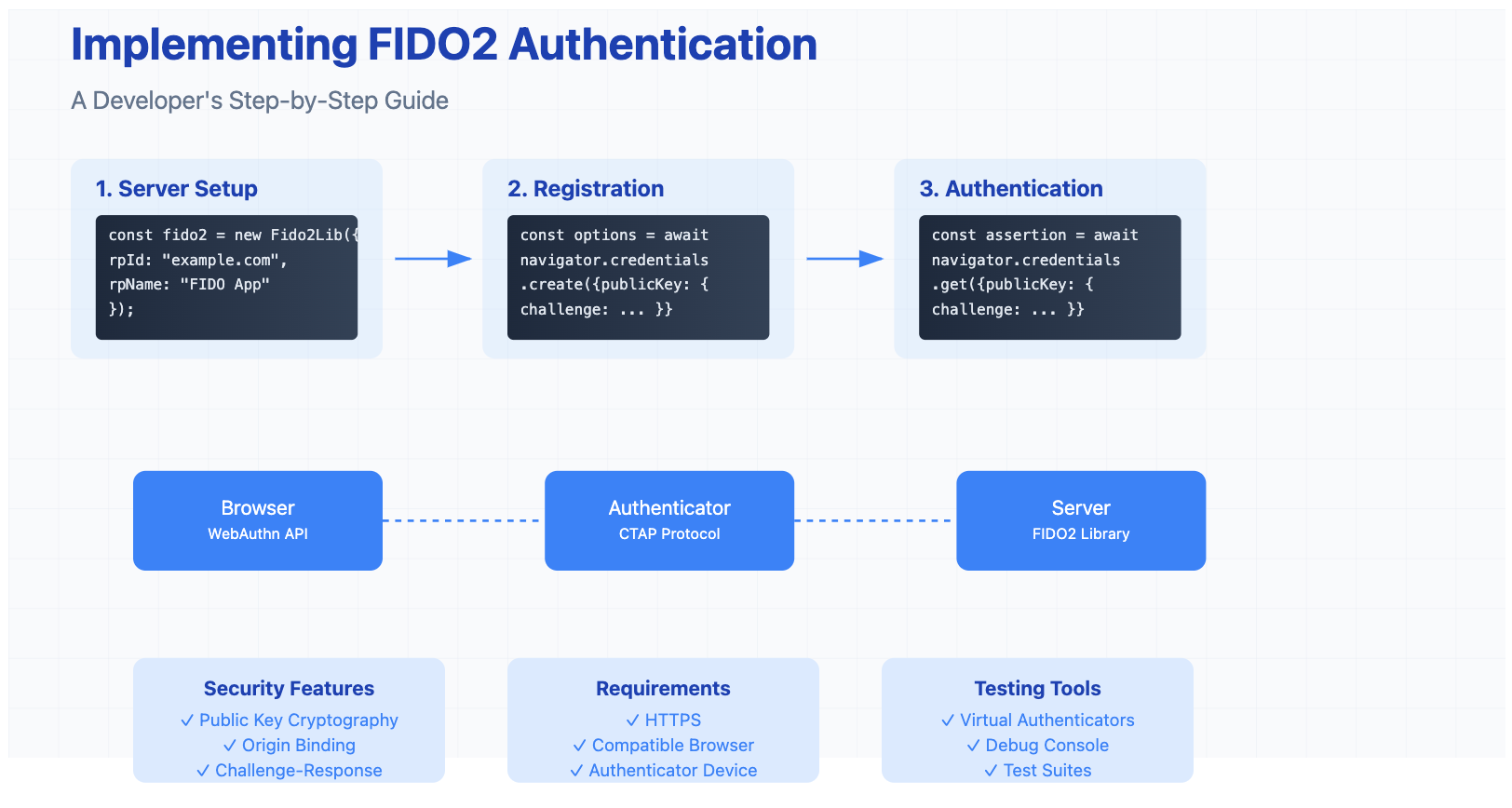
FIDO2 is the latest set of specifications from the FIDO Alliance, aiming to enable passwordless authentication. It comprises two main components:
WebAuthn API: A web standard published by the World Wide Web Consortium (W3C) that allows web applications to use public-key cryptography instead of passwords.
Client to Authenticator Protocol (CTAP): A protocol that enables an external authenticator (like a hardware security key) to communicate with the client (like a web browser).
Key Benefits of FIDO2:
Enhanced Security: Uses asymmetric cryptography, reducing the risk of credential theft.
Improved User Experience: Eliminates the need for passwords, making authentication seamless.
Phishing Resistance: Credentials are bound to specific origins, mitigating phishing attacks.
Why FIDO2?
Before diving into the implementation, let's understand why FIDO2 is worth your time:
No More Password Headaches
Zero password storage
No reset workflows needed
Reduced support costs
Superior Security
Phishing-resistant
Uses public key cryptography
Eliminates credential database risks
Better User Experience
Fast biometric authentication
No passwords to remember
Works across devices
Implementation Overview
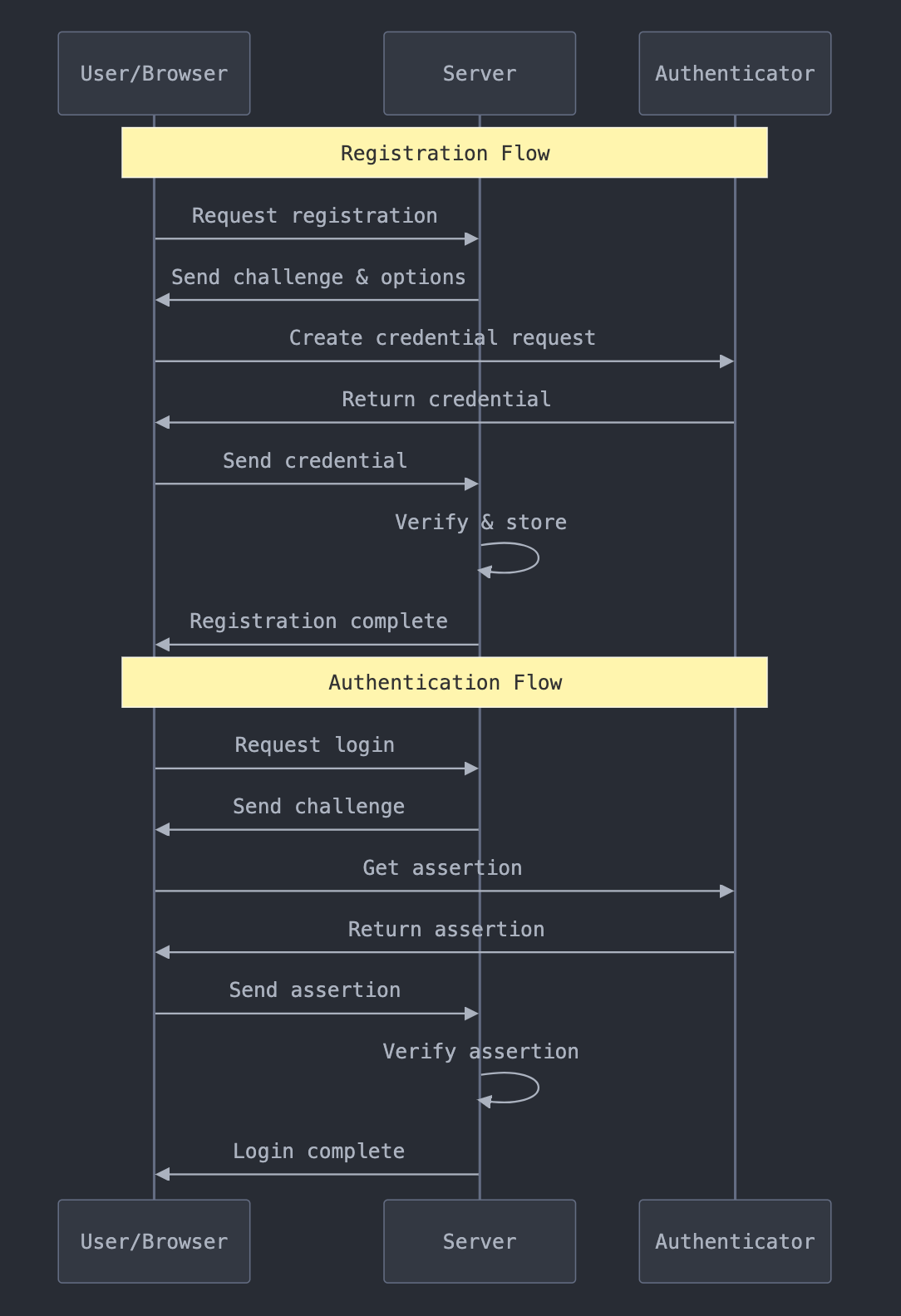
Here's what we'll build:
User registration with FIDO2 credentials
Passwordless login using those credentials
Secure session management
FIDO Authentication Flow
What You'll Need
// Required packages for Node.js
npm install fido2-lib express body-parser
Hardware Requirements
Authenticator Devices: FIDO2-compatible security keys (e.g., YubiKey 5 Series) or biometric devices like fingerprint scanners.
Development Machine: A computer capable of running a web server and accessing the internet.
Test Devices: Multiple browsers and devices for cross-platform testing.
Software Requirements
Programming Language: Knowledge of JavaScript for client-side and a server-side language like Node.js, Python, or Java.
Web Server: Apache, Nginx, or any server capable of handling HTTPS requests.
Databases: MySQL, PostgreSQL, MongoDB, or any database for storing user credentials.
Libraries and Frameworks:
Client-Side: Support for the WebAuthn API.
Server-Side: FIDO2 server libraries compatible with your programming language.
Dependencies and Tools
SSL Certificates: HTTPS is required for WebAuthn.
Browser Support: Latest versions of Chrome, Firefox, Edge, or Safari.
Development Tools: Code editor (e.g., Visual Studio Code), Postman for API testing.
// Check if WebAuthn is supported
if (!window.PublicKeyCredential) {
  console.log('WebAuthn not supported');
  // Fall back to traditional authentication
  return;
}

// Check if user verifying platform authenticator is available
const available = await PublicKeyCredential.isUserVerifyingPlatformAuthenticatorAvailable();
if (!available) {
  console.log('Platform authenticator not available');
  // Consider security key instead
}
2. Error Handling
// Client-side error handling
try {
  const credential = await navigator.credentials.create({/*...*/});
} catch (error) {
  switch (error.name) {
    case 'NotAllowedError':
      console.log('User declined to create credential');
      break;
    case 'SecurityError':
      console.log('Origin not secure');
      break;
    default:
      console.error('Unknown error:', error);
  }
}
Hashing is a fundamental concept in computer science and cryptography that transforms input data of arbitrary size into a fixed-size output, typically a string of characters or bytes. Unlike encryption, which is designed to be reversible, hashing is a one-way function that should be computationally infeasible to reverse.
In this comprehensive guide, we'll explore the technical aspects of hashing, its applications in modern software development, and critical security considerations that every developer and security professional should understand.
Core Concepts
The Basics of Hashing
At its core, a hash function H takes an input (or 'message') M of arbitrary length and produces a fixed-size hash value h:
h = H(M)
For example, the SHA-256 algorithm always produces a 256-bit (32-byte) hash value, regardless of input size. This fixed-size output is one of the key characteristics that makes hashing useful for various applications.
Key Terminology
Message: The input data to be hashed
Hash Value: The fixed-size output (also called digest, hash code, or hash sum)
Hash Function: The algorithm that performs the transformation
Collision: When two different inputs produce the same hash value
Avalanche Effect: A small change in input resulting in a significantly different hash value
Properties of Hash Functions
A cryptographic hash function must satisfy several crucial properties to be considered secure and reliable:
1. Deterministic Output
The same input must always produce the same hash value
This property is essential for verification purposes
2. Quick Computation
The hash function must be efficient enough to compute quickly for any input
Computational complexity should be O(n) where n is the input size
3. Pre-image Resistance (One-way Function)
Given a hash value h, it should be computationally infeasible to find any input M where H(M) = h
This property is crucial for password storage and digital signatures
4. Second Pre-image Resistance
Given an input M1, it should be computationally infeasible to find a different input M2 where H(M1) = H(M2)
This prevents attackers from creating malicious data with the same hash as legitimate data
5. Collision Resistance
It should be computationally infeasible to find any two different inputs M1 and M2 where H(M1) = H(M2)
This is stronger than second pre-image resistance as the attacker can choose both inputs
How Hashing Works
Let's examine the internal mechanics of a typical hash function:
1. Input Processing
1. Pad the input to ensure its length is a multiple of the block size
2. Break the input into fixed-size blocks
3. Initialize internal state variables
2. Compression Function
The core of most hash functions is a compression function that processes each block with the current internal state:
# Pseudocode for basic hash function structure
def hash_function(message):
    # Initialize state
    state = initial_value

    # Process each block
    blocks = pad_and_split(message)
    for block in blocks:
        state = compression_function(state, block)

    # Finalize and return hash
    return finalize(state)
3. Finalization
The final state is transformed into the output hash value, often including:
Length encoding
Output transformation
Truncation if necessary
Common Hash Functions
SHA-256 (Secure Hash Algorithm 256-bit)
Part of the SHA-2 family
Produces 256-bit (32-byte) hash values
Widely used in security applications and blockchain technology
import timeit
import hashlib

def benchmark_hash(hash_func, data):
    start_time = timeit.default_timer()
    for _ in range(10000):
        hash_func(data).digest()
    return timeit.default_timer() - start_time

# Example usage
data = b"Hello, World!" * 1000
print(f"SHA-256: {benchmark_hash(hashlib.sha256, data):.4f} seconds")
Hardware Acceleration
Use hardware-accelerated implementations when available
Consider SIMD instructions for parallel hashing
Leverage GPU acceleration for batch operations
Future of Hashing
Quantum Computing Implications
Current hash functions may need larger output sizes
Development of quantum-resistant hash functions
Post-quantum cryptography considerations
Emerging Standards
NIST standardization efforts
Industry-specific requirements
New use cases in blockchain and distributed systems
Conclusion
Hashing remains a cornerstone of modern security systems, and understanding its proper implementation is crucial for both developers and security professionals. As the technology landscape evolves, staying updated with the latest developments in hash functions and their applications is essential for maintaining robust security systems.
Remember:
Choose appropriate hash functions for specific use cases
Implement proper security measures
Stay informed about emerging threats and countermeasures
In an era where cybersecurity breaches cost organizations an average of $4.88 million (IBM Security, 2024), password security remains a critical vulnerability. Studies show that 81% of data breaches are caused by weak or stolen passwords, while 65% of people still reuse passwords across multiple accounts (Verizon Data Breach Report, 2024). Despite these alarming statistics, passwords currently secure over 100 billion online accounts globally – a number that continues to grow exponentially with digital transformation.
The Evolution of Password Security
The history of passwords dates back to ancient times, with military sentries using watchwords to identify friendly forces. However, the modern concept of computer passwords emerged in 1960 at MIT, when Fernando Corbató implemented the first computer password system for the Compatible Time-Sharing System (CTSS). This revolutionary step in digital security would shape authentication methods for decades to come.
Key Milestones in Password Evolution:
1960s: First computer password implementation
1970s: Introduction of encryption for stored passwords
1980s: Development of password policies and complexity requirements
1990s: Rise of password managers and automated tools
2000s: Implementation of multi-factor authentication
2010s: Emergence of biometric authentication
2020s: Movement toward passwordless solutions and AI-driven security
Despite this evolution, we find ourselves at a crucial intersection: while passwordless authentication represents the future, current digital infrastructure still heavily relies on traditional passwords. According to recent surveys, 67% of organizations plan to adopt passwordless authentication by 2025, yet only 22% have fully implemented such solutions today.
The Password Crisis and the Rise of AI Solutions
Before diving into AI password generators, it's crucial to understand the scale of the password crisis we face today. The average business employee manages 191 passwords, while cyber attacks targeting password credentials increased by 274% in 2022 alone. Traditional password creation methods are no longer sufficient to combat sophisticated cyber threats, leading to the emergence of AI-powered solutions.
Understanding AI Password Generators
AI password generators represent a significant advancement over traditional random password generators. These intelligent systems leverage machine learning algorithms to create passwords that are not only highly secure but also optimized for various requirements:
Pattern Recognition: AI systems analyze common password patterns and vulnerabilities to avoid creating passwords that could be easily cracked.
Contextual Awareness: The generator considers the specific requirements of different platforms and services, automatically adapting to their password policies.
Memorability Balance: While maintaining security, AI generators can create passwords with subtle patterns that make them slightly more memorable for humans when needed.
Key Benefits of AI Password Generators
Enhanced Security
Utilizes complex algorithms to generate truly random and unpredictable passwords
Adapts to emerging security threats and password-cracking techniques
Creates unique passwords that avoid common dictionary words and patterns
Intelligent Customization
Automatically adjusts to specific website requirements
Balances security with usability
Creates passwords that meet complex policy requirements without human intervention
Time Efficiency
Eliminates the need for manual password creation
Reduces the cognitive load of generating secure passwords
Streamlines the process of meeting various password requirements
Best Practices for Using AI Password Generators
Use in Conjunction with Password Managers
Store generated passwords securely
Enable easy access across devices
Maintain unique passwords for each account
Regular Password Updates
Set reminders for periodic password changes
Use the generator to create new secure passwords
Keep track of password changes in your password manager
Backup Authentication Methods
Enable two-factor authentication when available
Keep recovery codes in a secure location
Document backup access methods
The Transition to Passwordless Authentication
While AI password generators provide an excellent interim solution, the future of authentication is undeniably passwordless. Here's why:
Benefits of Passwordless Authentication
Eliminates password-related vulnerabilities
Reduces user friction and frustration
Increases security through biometric and token-based methods
Lowers support costs related to password resets
Current State of Passwordless Adoption
Many organizations and platforms are gradually implementing passwordless options:
Biometric authentication (fingerprint, face recognition)
Hardware security keys
Magic links and one-time codes
Public key cryptography
However, complete passwordless adoption faces several challenges:
Legacy system compatibility
Integration complexity
User adaptation and education
Cost of implementation
Bridging the Gap
Until passwordless authentication becomes universal, AI password generators serve as a crucial bridge:
Immediate Security Enhancement
Provides robust security for existing password-based systems
Helps maintain unique passwords across platforms
Reduces the risk of password-related breaches
Preparation for Transition
Familiarizes users with automated security tools
Builds trust in AI-driven security solutions
Enables gradual migration to passwordless systems
Future Outlook
As we move toward a passwordless future, the role of AI in authentication will continue to evolve:
Integration with biometric systems
Enhanced threat detection and response
Adaptive authentication based on user behavior
Seamless cross-platform authentication
Conclusion
While passwordless authentication represents the future of digital security, the reality is that passwords will remain a part of our digital lives for some time. AI password generators provide a sophisticated solution to bridge this gap, offering enhanced security and convenience while we transition to a passwordless future. By adopting these tools today, users and organizations can better protect their digital assets while preparing for the authentication methods of tomorrow.
Remember: The best approach is to embrace both current and future security measures – use AI password generators for existing password-based systems while actively adopting passwordless options whenever they become available. This hybrid approach ensures maximum security during the transition period and positions you well for the passwordless future ahead.
Based on real feedback from cybersecurity professionals
This analysis examines the current state of cybersecurity marketing, its challenges, and potential improvements based on direct feedback from industry professionals. The insights are derived from actual discussions among cybersecurity practitioners, offering a unique ground-level perspective on what works and what doesn't in cybersecurity marketing.
Key Problems Identified
1. Misaligned Target Audience
Marketing often targets management while neglecting technical decision-makers
Complex sales cycles involving multiple stakeholders are oversimplified
Quote: "Marketing is selling to the management, not the workers… Not even that anymore. Cybersecurity marketing sells to the influencers and stakeholders of the management."
2. Communication Disconnect
Several key issues emerge in how cybersecurity products are marketed:
Technical-Marketing Gap
Marketers often lack deep technical understanding
Complex security concepts get oversimplified
Technical accuracy suffers in favor of broad appeal
Aggressive Sales Tactics
Overwhelming volume of cold outreach
Unsolicited calendar invites
Quote: "I get so many cold emails… One was so cringey, annoying and persistent."
3. Marketing Team Challenges
From a marketing professional's perspective:
Knowledge Barriers
Limited technical expertise in marketing teams
Difficulty translating complex security concepts
Quote: "Few people talented in it want to move over into sales and marketing, so marketers — even excellent ones — are already starting at a knowledge deficit."
Organizational Issues
Limited access to actual customers
Reliance on second-hand information
Pressure for quick results over building relationships
What Works in Cybersecurity Marketing
1. Technical Excellence
Companies succeeding in cybersecurity marketing typically:
Produce detailed technical content
Maintain accuracy in their communications
Let their technical experts present at industry events
2. Successful Examples
Several organizations were highlighted for effective marketing:
Crowdstrike (cited as "gold standard")
Hive Systems (particularly for their infographics)
Microsoft threat reports
Verizon DBIR
3. Effective Approaches
Focus on technical accuracy over sensation
Provide valuable, educational content
Build trust through expertise demonstration
Quote: "True marketing should be about getting the right info to the right people so they can do their jobs better."
Recommendations for Improvement
1. For Marketing Teams
Invest in technical training for marketing staff
Build direct relationships with technical teams
Focus on educational content over fear-based messaging
Prioritize accuracy over quick wins
2. For Sales Approaches
Respect technical decision-makers' time
Focus on technical capabilities over buzzwords
Understand business concepts (OPEX, CAPEX, ROI)
Quote: "be honest… be technical… Understand business and accountancy."
3. For Content Strategy
Develop in-depth technical content
Focus on solving specific problems
Avoid oversimplification of complex topics
Build trust through consistent value delivery
The Role of AI in Transforming Cybersecurity Marketing
Current AI Solutions
Modern AI platforms specifically designed for cybersecurity marketing are emerging to address these challenges. These solutions offer:
Technical Accuracy Assurance
AI-powered technical validation
Automated jargon checking
Consistency in security terminology
Real-time technical accuracy scoring
Content Optimization
Multi-audience content adaptation
SEO optimization for security terms
Technical depth analysis
Engagement optimization
Efficiency Improvements
75% reduction in content production time
80% reduction in technical SME review time
5x content production scale
Coverage of 2500+ security keywords
Future Potential
As AI continues to evolve, we can expect:
More sophisticated technical validation
Better audience segmentation
Improved personalization
Enhanced technical accuracy
Faster content production while maintaining quality
Conclusion
The disconnect in cybersecurity marketing largely stems from the complexity of the subject matter and the challenge of bridging technical expertise with marketing effectiveness. While AI tools offer promising solutions, success ultimately requires a fundamental shift toward technical accuracy, respect for the audience's expertise, and a focus on delivering genuine value over quick sales.
Key Takeaway
Quote: "If you can't speak the native language of your audience and respect their intelligence, then what you're doing isn't really marketing. At least not in cybers."
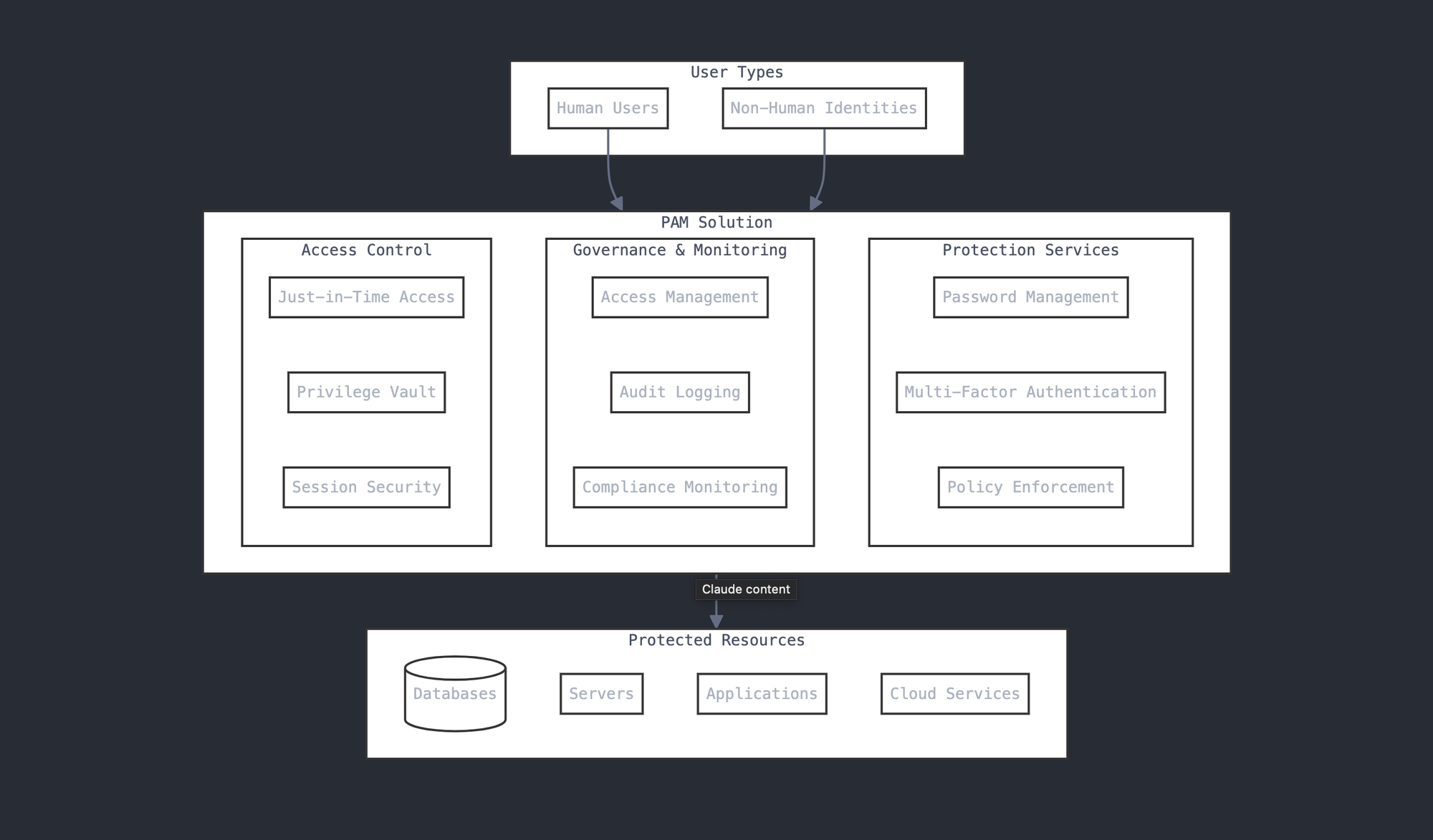
Cybersecurity threats are growing exponentially, and protecting privileged access has become a cornerstone of any robust defense strategy. Privileged Access Management (PAM) is not just a tool but a philosophy that helps organizations safeguard their most sensitive data and systems. This guide breaks down everything cybersecurity professionals need to know about PAM—its basics, history, and where it's headed.
Table of Contents
Introduction to PAM
Historical Context and Evolution
Understanding PAM Architecture
Essential PAM Capabilities
Cloud-Specific PAM Considerations
Zero Trust and PAM
Best Practices and Guidelines
Compliance and Regulatory Considerations
Common Challenges and Solutions
Measuring PAM Success
Future Trends and Evolution
Conclusion and Next Steps
1. Introduction to Privileged Access Management (PAM)
Think of privileged access like having a master key to your organization's most valuable rooms. Just as you wouldn't want everyone to have access to every room in a building, organizations need to carefully control who has access to sensitive systems and data. This is where Privileged Access Management comes in.
PAM is a set of tools and practices designed to secure accounts with elevated access to critical systems and data. It as a vault, not just for passwords but also for all forms of privileged access, ensuring only the right people have access to the right resources at the right time.
Historically, administrators managed privileged access with shared root or admin credentials. Over time, as systems became more interconnected, the risks of mishandling these accounts skyrocketed. This led to the evolution of PAM into a sophisticated solution that doesn’t just secure but also monitors and controls privileged access.
What is PAM?
Privileged Access Management (PAM) is a comprehensive security strategy and set of technologies designed to control, monitor, and secure elevated access to an organization's critical resources. It's like having a sophisticated security system that not only controls who gets the master keys but also tracks how they use them and ensures they return them when they're done.
Understanding PAM (Privileged Access Management)
Why PAM Matters Today
Organizations face increasing cybersecurity threats from both external attackers and potential insider risks. Consider these facts:
According to recent studies, 80% of cloud breaches involve compromised credentials
Over 74% of data breaches start with privileged access abuse
The average cost of a data breach has reached millions of dollars
PAM has become more critical than ever because:
Organizations are moving to the cloud, expanding their attack surface
Remote work has become the norm, requiring secure access from anywhere
Regulatory compliance requirements are becoming stricter
Cyber attacks are growing more sophisticated
The cost of data breaches continues to rise
2. Historical Context and Evolution of PAM
The Early Days: Password Vaults
PAM started simply – as password vaults in the late 1990s and early 2000s. Think of these early systems as digital safes where organizations stored their most important passwords. While better than writing passwords down or sharing them verbally, these systems were basic and often isolated.
The Transition Years: Beyond Simple Storage
As organizations grew more complex and cyber threats evolved, PAM evolved too. Key developments included:
Mid-2000s:
Introduction of session monitoring and recording
Basic privilege elevation capabilities
Initial automation of password changes
2010-2015:
Integration with identity management systems
Enhanced audit and compliance features
Introduction of privileged session management
Development of application-to-application password management
2015-2020:
Cloud-ready PAM solutions emerge
Just-In-Time (JIT) privilege elevation
Integration with DevOps tools and processes
Advanced threat analytics
Modern PAM: A Comprehensive Security Approach
Today's PAM solutions are sophisticated platforms that offer:
Core Capabilities:
Privileged account discovery and management
Password and secrets management
Session recording and monitoring
Access request and approval workflows
Real-time threat detection
Cloud infrastructure protection
Advanced Features:
AI-powered threat detection
Zero Trust architecture support
Cloud-native privileged access management
DevOps secrets management
Just-In-Time access provisioning
Robust reporting and analytics
The Market Today
The PAM market has grown significantly:
Current market size: $2.37 billion (2024)
Expected growth rate: 10% annually
Major players: CyberArk, Delinea, BeyondTrust, and others
Growing focus on cloud security and automation
Looking Ahead
PAM continues to evolve with:
Increased adoption of AI and machine learning
Enhanced cloud security capabilities
Greater integration with other security tools
Focus on user experience and automation
Expansion into new areas like IoT and operational technology
Understanding this evolution helps organizations appreciate why PAM has become such a critical component of cybersecurity strategy and why it continues to evolve to meet new challenges in our increasingly connected world.
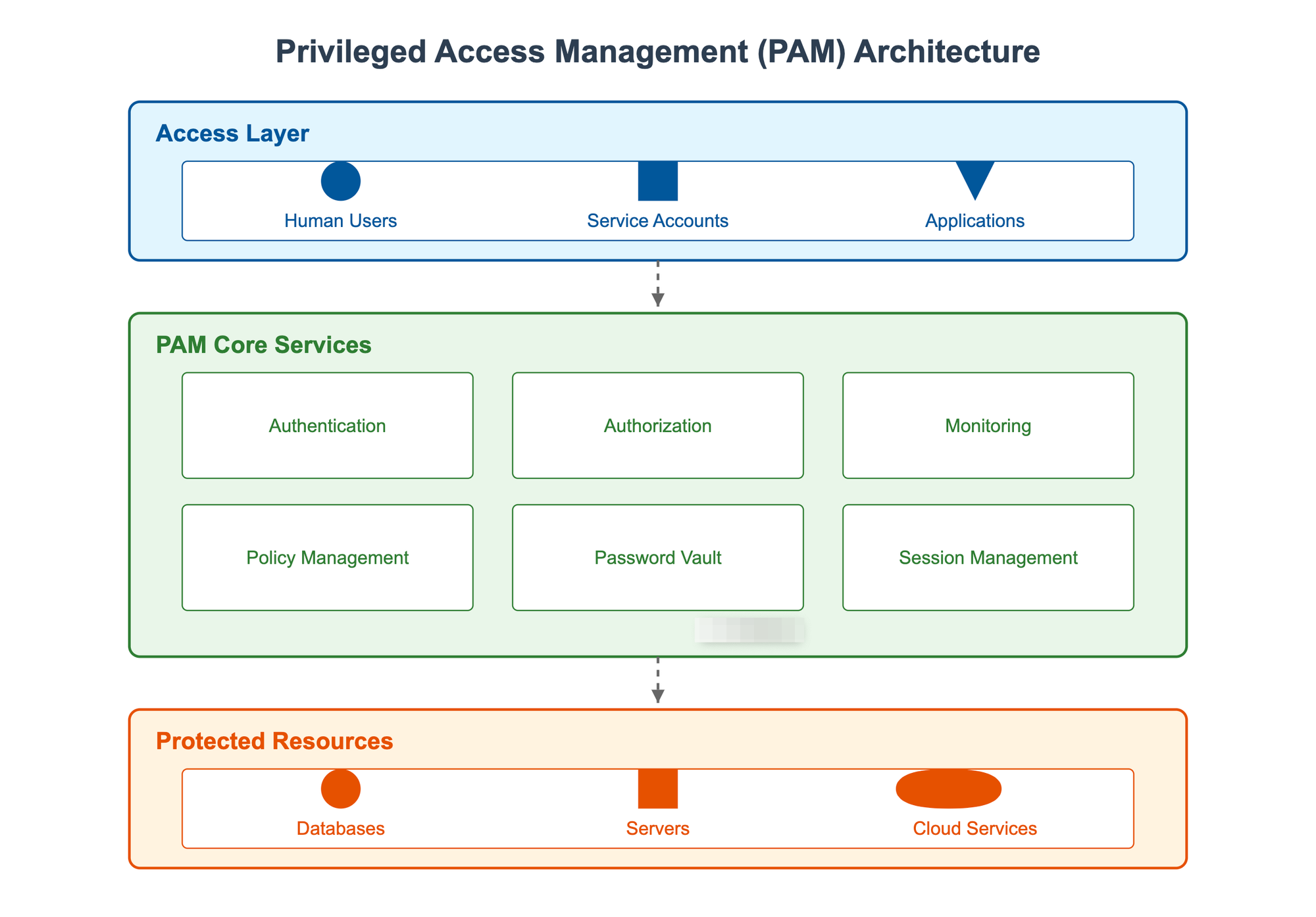
3. Understanding PAM Architecture: Building Blocks of Secure Access
The Foundation: What Makes Up a PAM System?
Think of a PAM system like a high-security bank. Just as a bank has various security layers – from the vault to security cameras to guard stations – PAM has multiple components working together to keep your privileged access secure. Let's break down each major component:
1. The Vault (Password and Secrets Management)
Picture this as the bank's main vault where all valuable items are stored. In PAM terms:
Stores all privileged credentials securely using strong encryption
Automatically changes passwords on a regular schedule
Manages encryption keys and digital certificates
Provides emergency access procedures (like the bank's emergency protocols)
Real-world example: When a system administrator needs to access a critical server, they don't actually see or know the password. The vault provides temporary access without exposing the actual credentials.
2. Access Control Center (Policy Engine)
Think of this as the bank's security office that decides who gets access to what. It:
Sets and enforces access rules
Determines who can access which systems
Controls when and how long access is granted
Manages approval workflows
Implements the principle of least privilege
Real-world example: A database administrator might need elevated access only during maintenance windows. The policy engine ensures they can't access the database outside these approved times.
3. Session Management (The Security Camera System)
Like a bank's surveillance system, this component:
Records all privileged sessions
Monitors active sessions in real-time
Can terminate suspicious sessions
Provides video-like playback for auditing
Creates searchable logs of all actions
Real-world example: If someone accesses a critical financial system, every keystroke and action is recorded, just like a security camera recording everyone in the bank vault.
4. Authentication Hub (The Security Checkpoint)
Similar to the bank's entry security, this component:
Verifies user identities
Manages multi-factor authentication
Integrates with existing identity systems
Controls access methods
Handles emergency access procedures
5. Discovery Engine (Security Patrol)
Like security guards doing regular patrols, this component:
Continuously scans for new privileged accounts
Identifies unmanaged privileged access
Detects security policy violations
Finds forgotten or orphaned accounts
Monitors for new systems and applications
How Privileged Access Management Works
PAM works on a simple principle—control, monitor, and minimize access. Here’s how it typically functions:
– Discovery: PAM tools identify all privileged accounts across systems, including hidden and inactive ones.
– Credential Management: It stores credentials in a secure vault, rotating them regularly to prevent misuse.
– Session Monitoring: PAM tracks user activities during privileged sessions, recording commands and actions for auditing.
– Just-In-Time Access: Instead of always-on privileges, users get access only when they need it and only for specific tasks.
These mechanisms ensure that organizations enforce the “least privilege” principle, granting users only the permissions they need to perform their duties.
PAM Deployment Models: Choosing Your Security Setup
1. On-Premises Deployment
Complete control over all components
Direct management of security
Higher initial costs but potentially lower long-term costs
Requires dedicated IT staff and infrastructure
Best for: Organizations with strict data sovereignty requirements or heavily regulated industries
2. Cloud-Based PAM (SaaS)
Lower initial setup costs
Automatic updates and maintenance
Scalable based on needs
Managed by the vendor
Always accessible from anywhere
Best for: Organizations looking for quick deployment and minimal infrastructure management
3. Hybrid Deployment
Combines on-premises and cloud components
Flexible architecture
Can keep sensitive data local while leveraging cloud benefits
Balances control and convenience
Best for: Organizations with diverse needs or those transitioning to the cloud
Integration Points: Connecting Your Security Systems
Essential Integrations
PAM needs to work with:
Identity Management Systems (like Active Directory)
Cloud Platforms (AWS, Azure, Google Cloud)
Security Information and Event Management (SIEM) systems
IT Service Management (ITSM) tools
DevOps tools and pipelines
Modern PAM Architecture Features
1. Zero Trust Implementation
Never trust, always verify approach
Continuous verification of every access attempt
Context-based authentication
Just-In-Time access provisioning
2. AI/ML Capabilities
Anomaly detection in access patterns
Risk-based access decisions
Predictive security analytics
Automated threat response
3. Automation Features
Automated password rotation
Scheduled access provisioning
Automated compliance reporting
Self-service access requests
Best Practices for PAM Architecture
Layer Your Security
Multiple authentication factors
Separate admin and user networks
Segmented access levels
Build in Redundancy
High availability setup
Disaster recovery plans
Emergency access procedures
Plan for Scale
Start small but plan big
Use modular components
Choose flexible integration options
Focus on User Experience
Simple, intuitive interfaces
Streamlined access requests
Clear security policies
Efficient workflows
Common Challenges and Solutions
Challenge 1: Complex Implementation
Solution: Start with critical systems first, then expand gradually
Challenge 2: User Resistance
Solution: Focus on making security seamless and user-friendly
Challenge 3: Legacy System Integration
Solution: Use PAM solutions with broad protocol support and flexible APIs
Challenge 4: Cloud Migration
Solution: Choose a PAM solution that supports hybrid environments and cloud-native features
Future Architecture Trends
Increased Automation
More self-service capabilities
Automated compliance reporting
AI-driven decision making
Enhanced Cloud Integration
Better cloud-native support
Improved container security
Serverless architecture support
Advanced Analytics
Real-time risk assessment
Predictive security measures
Behavioral analytics
Remember: The best PAM architecture is one that balances security with usability. It should be robust enough to protect your most sensitive assets while being simple enough for daily use without disrupting business operations.
4. Essential PAM Capabilities: A Deep Dive
Standard, Advanced, and Emerging PAM Capabilities
Standard Capabilities: These include credential vaulting, session monitoring, and auditing. They form the backbone of any PAM system and help meet compliance standards.
Advanced Capabilities: Today’s PAM solutions leverage AI to detect anomalies, automate entitlement reviews, and provide Just-In-Time (JIT) access.
Emerging Capabilities: The future of PAM lies in passwordless authentication, invisible PAM (seamless, user-friendly management), and advanced integration with identity threat detection systems.
Let's break down the key capabilities of modern PAM solutions in simple terms, understanding why each matters and how they work together.
Password Vaulting and Management
How It Works
Stores privileged passwords in an encrypted, secure database
Automatically changes passwords on a regular schedule
Requires approval before anyone can use sensitive passwords
Keeps a detailed log of who accessed what and when
Example: Imagine a database administrator needs to access a critical server. Instead of knowing the actual password:
They request access through the PAM system
If approved, they get temporary access
The system automatically changes the password after use
Everything is logged for security review
Session Management and Monitoring
Key Features
Records all privileged sessions (like watching a security camera recording)
Allows real-time monitoring of sensitive activities
Can instantly terminate suspicious sessions
Creates searchable logs of all actions taken
Example: When a contractor accesses your systems:
Every command they type is recorded
Sensitive actions trigger alerts
Security teams can watch in real-time if needed
All activity is saved for audit purposes
Access Control and Elevation
This capability ensures users only get the exact level of access they need, when they need it.
How It Works
Users start with basic access
They request elevated privileges for specific tasks
Approval workflows manage these requests
Access is automatically revoked when the task is complete
Example: A help desk technician needs to install software on a user's computer:
They request temporary admin rights
Their manager approves for a 2-hour window
They complete the installation
Admin rights automatically expire
Privileged Account Discovery
This helps organizations find and manage all their privileged accounts – even ones they didn't know existed.
Key Functions
Automatically scans systems for privileged accounts
Identifies unused or dormant accounts
Detects unauthorized privilege escalations
Maps relationships between accounts and systems
5. Cloud-Specific PAM Considerations
Understanding the Cloud Security Challenge
Imagine moving from a house where you control all the locks to a large apartment complex where some security is managed by others. That's similar to the challenge organizations face when moving to the cloud. You still need to protect your assets, but the way you do it changes completely.
Key Areas of Focus
Different Types of Cloud Services
Infrastructure as a Service (IaaS):
Example: AWS EC2, Azure Virtual Machines
Key focus: Securing admin access to servers and infrastructure
Platform as a Service (PaaS):
Example: Azure SQL Database, Google App Engine
Key focus: Managing developer and application access
Software as a Service (SaaS):
Example: Salesforce, Microsoft 365
Key focus: Controlling admin and user privileges
Cloud-Specific Security Controls
Identity Management (IAM)
Single Sign-On (SSO) integration
Multi-factor authentication (MFA)
Just-In-Time access
Entitlement Management (CIEM)
Understanding who has access to what
Regular access reviews
Automated privilege cleanup
Access Monitoring
Real-time activity tracking
Anomaly detection
Compliance reporting
6. Zero Trust and PAM
Understanding Zero Trust Simply
Think of traditional security like checking ID at the front door of a building. Once inside, people could go anywhere. Zero Trust is like checking ID at every door, every time – even if someone was just in that room five minutes ago.
Key Principles of Zero Trust in PAM
1. Never Trust, Always Verify
Every access request must be validated
No automatic trust based on location or network
Continuous verification of identity
2. Least Privilege Access
Give only the minimum access needed
Time-limited access grants
Regular access reviews and removals
3. Assume Breach
Act as if your system is already compromised
Monitor all privileged sessions
Record all privileged activities
Quick response to suspicious behavior
Implementing Zero Trust
Identity Verification
Strong authentication methods
Regular credential rotation
Biometric authentication where appropriate
Access Control
Just-In-Time access provisioning
Risk-based access decisions
Automatic access revocation
Monitoring and Analytics
Behavioral analysis
Anomaly detection
Real-time alerts
7. Best Practices and Guidelines
Implementing PAM in Modern Enterprises
Deploying PAM is not just about buying a tool; it’s about embedding it into your security culture. Here’s a roadmap:
Discover Privileged Accounts: Use PAM tools to find all accounts with elevated privileges, even those forgotten over time.
Define Policies: Clearly outline who gets access to what and under what conditions.
Select the Right Solution: Choose a PAM solution that fits your needs—whether it’s SaaS for scalability or on-premises for control.
Integrate with Existing Systems: Connect PAM with your IAM, cloud environments, and DevOps tools.
Continuous Monitoring: Regularly audit privileged access logs and refine policies to adapt to new threats.
Practical Implementation Steps
Start Small
Begin with most critical systems
Pilot with a small group
Gather feedback and adjust
Gradually expand scope
Focus on User Experience
Make access requests simple
Provide clear instructions
Offer self-service options
Quick response to access needs
Automate Where Possible
Password rotation
Access reviews
Compliance reports
Alert responses
The Business Value of PAM
Securing privileged access isn’t just good cybersecurity—it’s good business. Here’s why:
Reduced Risk: By minimizing the attack surface, PAM makes it harder for adversaries to exploit your systems.
Compliance Made Easier: Most regulatory frameworks, like GDPR and HIPAA, require stringent control over privileged accounts.
Operational Efficiency: Automating tasks like credential rotation saves time and reduces errors.
Improved Trust: When your systems are secure, customers and stakeholders feel more confident in your organization.
8. Compliance and Regulatory Considerations
Understanding Compliance Requirements
Common Regulations
GDPR (General Data Protection Regulation)
Personal data protection
Access control requirements
Audit trail needs
Breach notification rules
SOC
Financial systems access control
Audit requirements
Change management
Documentation needs
PCI DSS
Payment card data protection
Access control requirements
Monitoring and logging
Regular testing
Practical Compliance Steps
1. Documentation
Written policies and procedures
Access control matrices
Regular review and updates
Incident response plans
2. Implementation
Technical controls alignment
Regular compliance checks
Automated compliance reporting
Training and awareness
3. Monitoring and Reporting
Regular compliance audits
Automated compliance checks
Exception management
Incident response testing
Making Compliance Work
Integrate with Business Processes
Build compliance into workflows
Automate compliance checks
Regular training and updates
Clear escalation paths
Regular Reviews
Quarterly compliance checks
Annual policy reviews
Regular training updates
Audit preparation
Continuous Improvement
Learn from incidents
Update procedures as needed
Incorporate new requirements
Refine processes based on feedback
9. Common Challenges and Solutions
Despite its benefits, PAM adoption can be challenging:
Implementation Challenges
1. Technical Complexity
Challenge: Complex integration with existing systems
Solution:
Start with critical systems first
Use pre-built connectors where possible
Engage vendor professional services
Document all configurations
User Resistance
Challenge: Users resist change and new security measures
Solution:
Phased implementation approach
Clear communication of benefits
User-friendly interfaces
Regular training and support
3. Cost Management
Challenge: High implementation and maintenance costs
Solution:
Start with essential features
Clear ROI calculation
Phased budget allocation
Regular cost-benefit analysis
Operational Challenges
1. Performance Impact
Challenge: PAM solutions can slow down access
Solution:
Optimize configurations
Use caching where appropriate
Regular performance monitoring
Load balancing for large deployments
2. Emergency Access
Challenge: Handling urgent access needs
Solution:
Break-glass procedures
Emergency access protocols
Documented escalation paths
Post-incident review process
10. Measuring PAM Success
Key Performance Indicators (KPIs)
Security Metrics
Number of privileged account breaches
Time to detect unauthorized access
Number of failed access attempts
Password policy compliance rate
Operational Metrics
Average time for access approval
System uptime
Number of emergency access requests
Help desk tickets related to access
Business Impact Metrics
Cost savings from automated processes
Reduction in audit findings
Compliance violation reduction
Time saved in access management
ROI Calculation
Cost Factors
Implementation costs
Training expenses
Ongoing maintenance
Staff time allocation
Benefits Quantification
Security incident reduction
Audit cost savings
Operational efficiency gains
Compliance penalty avoidance
11. Future Trends and Evolution in PAM
The PAM landscape is evolving rapidly, and these trends are shaping its future:
AI and Machine Learning Integration
Automated Threat Detection
AI systems that can spot unusual patterns in privileged access
Real-time alerts for suspicious activities
Learning from past incidents to prevent future ones
Smart Access Decisions
AI-powered recommendations for access approvals
Automated risk scoring for access requests
Predictive analytics for potential security issues
Zero-Standing Privileges
Moving away from permanent privileged access
Just-In-Time (JIT) access becoming the norm
Dynamic privilege assignment based on context
Unified Identity Security Platforms
Combining PAM with IAM and CIEM for a holistic approach
Hybrid and multi-cloud environments
Cloud-Native Solutions
Built specifically for cloud environments
Better integration with cloud services
Improved scalability and flexibility
Emerging Technologies
Blockchain for PAM
Immutable audit trails
Decentralized access control
Enhanced transparency
Quantum-Safe Security
Preparing for quantum computing threats
New encryption methods
Future-proofing access controls
Conclusion and Next Steps
As organizations increasingly digitize their operations, Privileged Access Management is no longer optional—it’s essential. Whether you’re a large enterprise or a small business, securing privileged access protects your most critical assets from internal and external threats. Here's why PAM solutions are essential:
For Human Identities:
Privileged accounts are prime targets for cyber attacks, as they provide extensive access to sensitive systems and data
PAM ensures that users only have the minimum necessary privileges required for their roles, reducing the attack surface
It enables detailed audit trails of privileged activities, crucial for compliance and incident investigation
Automated password management prevents credential sharing and ensures regular rotation of sensitive credentials
For Non-Human Identities:
The proliferation of service accounts, APIs, and automated processes creates a complex web of machine identities
PAM solutions manage and secure machine-to-machine communications, preventing unauthorized access
They provide just-in-time access for applications and services, reducing standing privileges
Automated credential management for applications and services eliminates hardcoded passwords in scripts
Future Essentials:
As organizations adopt more cloud services and IoT devices, the number of privileged accounts will grow exponentially
Zero-trust security models require granular access control and continuous verification that PAM provides
AI and automation will increase the need for secure machine identity management
Regulatory compliance requirements are becoming stricter, making PAM's audit and control features indispensable
The rise of sophisticated cyber threats and the expanding digital footprint of organizations make PAM not just a security tool, but a business enabler that protects critical assets while enabling digital transformation. Without robust PAM solutions, organizations risk unauthorized access, data breaches, compliance violations, and potential business disruption.
Take the first step today: assess your organization’s privileged access landscape, choose the right PAM solution, and build a culture of security. Remember, in the world of cybersecurity, it’s better to be proactive than reactive.
The journey of cryptographic hash functions mirrors the evolution of digital security itself. From the early days of MD5 to modern quantum-resistant algorithms, each generation of hash functions has emerged from the lessons learned from its predecessors. This article explores this fascinating evolution, examining the technical details, security considerations, and historical context of each major development in hashing algorithms.
Table of Contents
Early Foundations (1989-1995)
The Rise and Fall of MD5
The SHA Family Evolution
Modern Innovations
Future Directions
Performance Comparisons
Implementation Considerations
Early Foundations (1989-1995)
The Birth of Modern Cryptographic Hashing
The concept of cryptographic hashing emerged from the need for efficient data integrity verification. The earliest widely-used hash functions were based on block cipher constructions:
Initial Hash Functions:
- Rabin's Hash (1978)
- Merkle-Damgård construction (1979)
- Davies-Meyer construction (1985)
These fundamental constructions established the basic principles that would influence all future hash functions:
Deterministic output
Avalanche effect
Preimage resistance
Collision resistance
Technical Foundation: The Merkle-Damgård Construction
The Merkle-Damgård construction remains fundamental to many modern hash functions. Here's its basic structure:
1. Message padding: M → M' (length is multiple of block size)
2. Break M' into fixed-size blocks: m₁, m₂, ..., mₙ
3. Initialize h₀ (IV)
4. For each block i:
   hᵢ = f(hᵢ₋₁, mᵢ)
5. Output hₙ as the hash
The Rise and Fall of MD5
MD5's Architecture
MD5, designed by Ron Rivest in 1991, processes messages in 512-bit blocks and produces a 128-bit hash value. Its core operation involves four rounds of similar operations:
// Core MD5 operation (simplified)
F(X,Y,Z) = (X & Y) | (~X & Z)
G(X,Y,Z) = (X & Z) | (Y & ~Z)
H(X,Y,Z) = X ^ Y ^ Z
I(X,Y,Z) = Y ^ (X | ~Z)
The Fall of MD5
MD5's vulnerabilities emerged gradually:
1996: First collision vulnerabilities identified
2004: Wang et al. demonstrated practical collisions
2008: Chosen-prefix collisions demonstrated
Example of an MD5 collision (discovered by Wang et al.):
Message 1 (hex):
d131dd02c5e6eec4693d9a0698aff95c2fcab58712467eab4004583eb8fb7f89...

Message 2 (hex):
d131dd02c5e6eec4693d9a0698aff95c2fcab50712467eab4004583eb8fb7f89...

Both produce MD5 hash:
79054025255fb1a26e4bc422aef54eb4
The evolution of hash functions reflects our growing understanding of cryptographic security. From MD5's early innovations to modern quantum-resistant designs, each generation has built upon the lessons of its predecessors. As we move forward, the focus shifts to specialized applications, performance optimization, and quantum resistance, ensuring hash functions continue to serve as fundamental building blocks of digital security.
On a quiet Friday afternoon in May 2017, a hospital administrator in the UK clicked on what seemed like a routine email. Within hours, the WannaCry ransomware had spread across the National Health Service, eventually affecting over 200,000 computers across 150 countries. This watershed moment in cybersecurity history highlighted a sobering reality: in our interconnected world, the line between digital security and human lives has become increasingly blurred.
The Evolution of Cyber Threats: A Historical Perspective
The Early Days: Technical Exploits
In the 1980s and early 1990s, cyber attacks were primarily the domain of technically skilled individuals focusing on exposing system vulnerabilities. The Morris Worm of 1988, one of the first computer worms distributed via the internet, marked the beginning of a new era in digital security threats. However, these early attacks, while disruptive, were often more about proving technical prowess than causing widespread harm.
The Rise of Organized Cybercrime
As the internet became commercialized in the late 1990s and early 2000s, cybercrime evolved into a sophisticated, profit-driven enterprise. The landscape shifted from individual hackers to organized criminal networks, state-sponsored actors, and hacktivists. This transformation brought new attack vectors: targeted spear-phishing campaigns, advanced persistent threats (APTs), and sophisticated social engineering tactics.
The Modern Threat Landscape
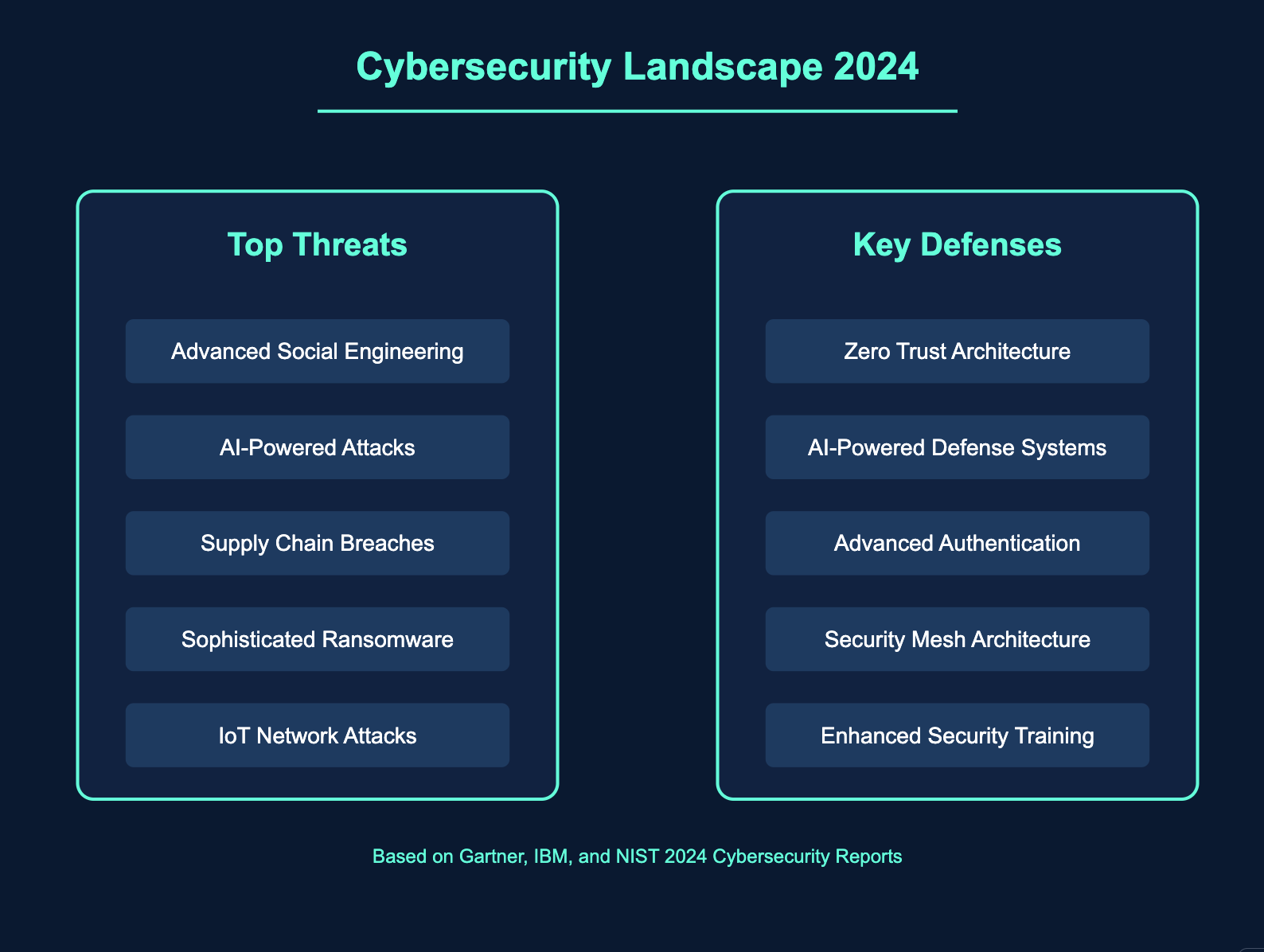
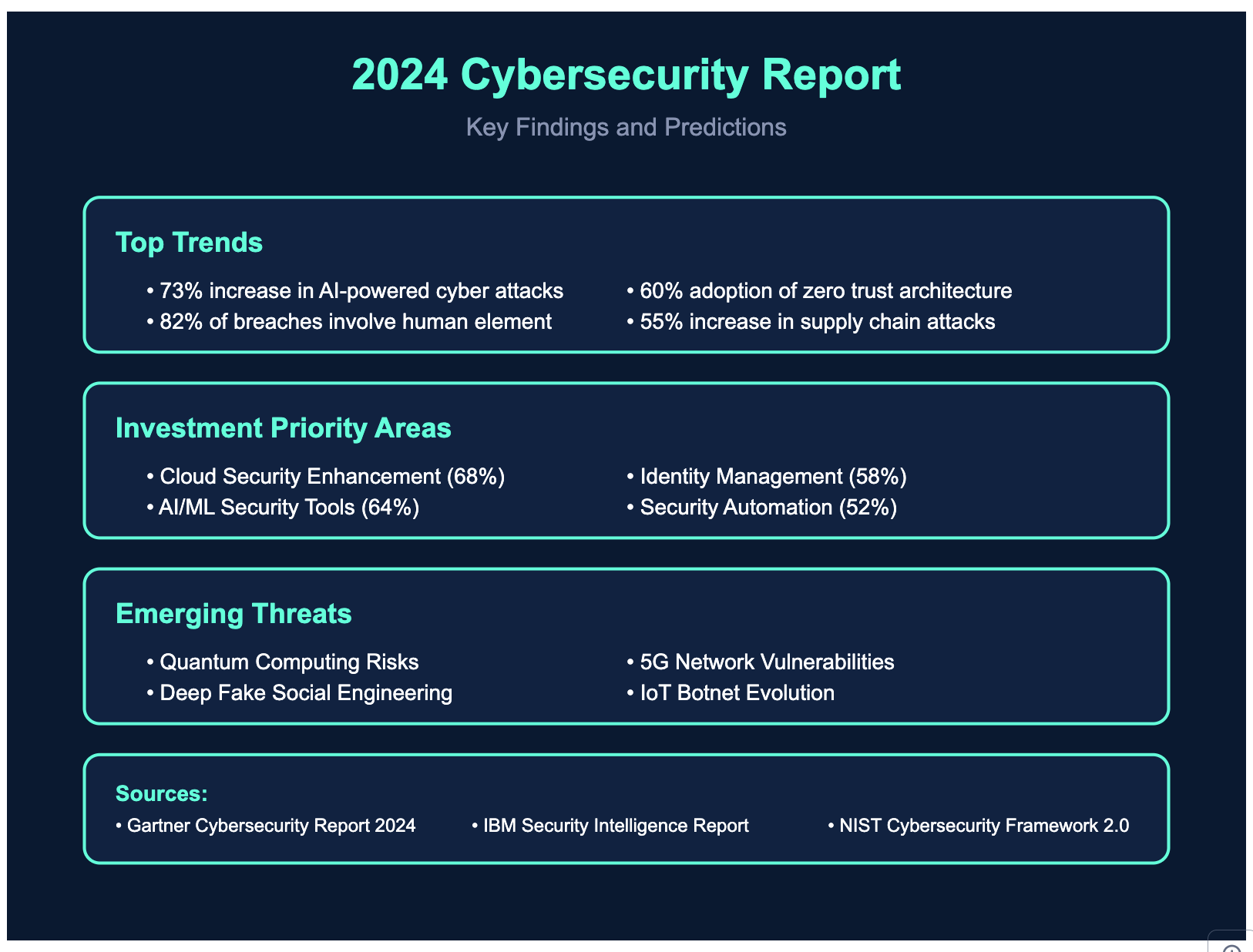
Today's cyber attacks represent a perfect storm of social manipulation, technical sophistication, and organizational complexity. Consider these statistics:
Social engineering is involved in over 98% of cyber attacks
The Human Element
Perhaps the most significant shift in cyber attacks has been the increasing focus on human psychology. Modern attackers understand that it's often easier to manipulate people than to break through technical defenses. Take the case of the 2020 Twitter hack, where teenagers successfully compromised high-profile accounts not through sophisticated malware, but by convincing Twitter employees to grant them access through social engineering.
Understanding Today's Battlefield
The modern cybersecurity landscape is characterized by several key factors:
Asymmetric Warfare
Attackers need to find only one vulnerability
Defenders must protect against all possible attack vectors
The cost of attacking is often lower than the cost of defense
Automation and Scale
Artificial Intelligence-powered attacks
Automated scanning and exploitation
Mass customization of attack vectors
Supply Chain Complexity
Interconnected systems and vendors
Third-party risk management
Cloud service dependencies
Regulatory Environment
GDPR, CCPA, and other privacy regulations
Industry-specific compliance requirements
Cross-border data protection laws
As we delve into the specific types of attacks and defense strategies, it's crucial to understand that cybersecurity is no longer just an IT issue—it's a fundamental business risk that requires a holistic approach combining technical controls, human awareness, and organizational resilience.
1. Social Engineering Attacks
Understanding the Threat
Social engineering attacks exploit human psychology rather than technical vulnerabilities. These attacks manipulate people into breaking security protocols or revealing sensitive information.
Common Types:
Phishing: Fraudulent attempts to obtain sensitive information by posing as trustworthy entities
Spear Phishing: Targeted phishing attacks against specific individuals or organizations
Vishing: Voice phishing using phone calls
Baiting: Leaving malware-infected physical devices in strategic locations
Pretexting: Creating a fabricated scenario to obtain information
Notable Incidents
2020 Twitter Bitcoin Scam: Attackers used social engineering to gain access to Twitter's internal tools, compromising high-profile accounts including those of Bill Gates, Elon Musk, and Barack Obama
2016 Snapchat Breach: An employee fell for a phishing email impersonating the CEO, revealing payroll information of 700 employees
Prevention Strategies
Employee Training Programs
Regular security awareness training
Simulated phishing exercises
Clear security protocols for handling sensitive information
Technical Controls
Email filtering systems
DMARC, SPF, and DKIM implementation
Multi-factor authentication (MFA)
2. Credential Stuffing
Understanding the Threat
Credential stuffing is an automated attack where cybercriminals use stolen username/password pairs to gain unauthorized access to user accounts through large-scale automated login requests.
Attack Mechanics
Attackers obtain leaked credentials from data breaches
Create automated scripts to test these credentials across multiple services
Exploit the common practice of password reuse
Use successful logins to perpetrate fraud or steal sensitive information
2019 Dunkin' Donuts: Customer accounts breached through credential stuffing attacks
2016 Netflix Credential Stuffing: Attackers used stolen credentials to access and sell Netflix accounts
Prevention Strategies
Technical Measures
Implement robust rate limiting
Use CAPTCHAs for suspicious login attempts
Deploy Web Application Firewalls (WAF)
Implement IP-based blocking for suspicious activities
Authentication Enhancement
Mandate strong password policies
Implement MFA
Use passwordless authentication methods
Monitor for compromised credentials
User Education
Encourage unique passwords for each service
Promote password manager usage
Regular security awareness training
3. Emerging Attack Vectors
AI-Powered Attacks
Deepfake Social Engineering: Using AI-generated voice and video to impersonate executives
Automated Attack Pattern Generation: AI systems creating sophisticated attack patterns
Behavioral Analysis Evasion: Using AI to mimic legitimate user behavior
Prevention Evolution
Zero Trust Architecture
Verify every request regardless of source
Continuous authentication and authorization
Microsegmentation of networks
AI-Powered Defense
Behavioral biometrics
Anomaly detection
Predictive threat analysis
Blockchain-Based Identity
Decentralized identity verification
Immutable audit trails
Self-sovereign identity solutions
4. Future of Cybersecurity Defense
Next-Generation Authentication and Identity
Advanced Biometric Systems
Multi-modal biometric fusion
Combining facial, voice, and behavioral patterns
Contextual authentication factors
Liveness detection and anti-spoofing
Continuous Authentication Frameworks
Real-time behavior analysis
Risk-based authentication scoring
Adaptive security policies
Neural Biometrics
Brain-wave pattern recognition
Cognitive fingerprinting
Emotional state analysis
Quantum-Era Cryptography
Post-Quantum Algorithms
Lattice-based cryptography
Hash-based signatures
Multivariate cryptographic systems
Quantum Key Distribution (QKD)
Satellite-based QKD networks
Metropolitan QKD infrastructure
Quantum random number generators
Hybrid Cryptographic Systems
Classical-quantum combinations
Algorithm agility
Backward compatibility solutions
Advanced Defense Systems
AI-Powered Security Operations
Autonomous Security Platforms
Self-learning security systems
Predictive threat detection
Automated response orchestration
Cognitive Security Analytics
Natural language threat analysis
Visual pattern recognition
Contextual risk assessment
Neural Network Defense
Deep learning attack detection
Adversarial AI protection
AI-driven forensics
Self-Healing Architecture
Automated Resilience
Real-time vulnerability remediation
Dynamic security policy adjustment
Autonomous system hardening
Intelligent Recovery Systems
Automated backup verification
Smart failover mechanisms
Self-restoring configurations
Adaptive Security Mesh
Dynamic security perimeter
Automated microsegmentation
Context-aware protection
Privacy-Preserving Computing
Zero-Knowledge Systems
Advanced ZK-proof protocols
Privacy-preserving authentication
Secure multi-party computation
Homomorphic Encryption
Fully homomorphic encryption applications
Encrypted data processing
Secure cloud computing
Confidential Computing
Hardware-based encryption
Secure enclaves
Trusted execution environments
Emerging Defense Paradigms
Biological Security Integration
DNA-Based Authentication
Genetic verification systems
Molecular computing security
Bioelectric authentication
Human-Computer Interface Security
Neural interface protection
Thought-based authentication
Biological encryption keys
Quantum Defense Systems
Quantum Sensing
Quantum radar detection
Quantum imaging security
Quantum sensor networks
Quantum Machine Learning
Quantum pattern recognition
Quantum anomaly detection
Quantum optimization for security
Distributed Security Frameworks
Blockchain-Based Security
Decentralized identity management
Smart contract security controls
Distributed security governance
Edge Security Mesh
Autonomous edge protection
Distributed threat detection
Edge-based encryption
Cognitive Security Solutions
Natural Interface Security
Voice command authentication
Gesture-based security
Ambient computing protection
Emotional Intelligence Security
Stress-based threat detection
Emotional state authentication
Psychological security profiling
Comprehensive Implementation Guide
Immediate Actions: Building the Foundation
Enhanced Security Baseline
Implement Risk-Based MFA
Adaptive authentication based on user behavior
Context-aware access policies
Biometric authentication for critical systems
Comprehensive Security Audits
Automated vulnerability scanning
Third-party security assessments
Compliance gap analysis
Advanced Incident Response
Automated playbooks for common scenarios
Integration with SOAR platforms
Regular tabletop exercises
Modern Employee Training
Gamified security awareness programs
Role-specific security training
Measured learning outcomes
Advanced Technical Controls
Zero Trust Network Architecture
Microsegmentation with dynamic policies
Identity-aware proxies
Just-in-time access provisioning
Next-Gen Access Control
Attribute-based access control (ABAC)
Risk-adaptive access control
Continuous authorization
Enhanced Monitoring
ML-powered SIEM systems
User and entity behavior analytics (UEBA)
Network detection and response (NDR)
Comprehensive Testing
Purple team exercises
Adversary emulation
Bug bounty programs
Long-term Strategy: Building Resilience
Evolution of Security Culture
Security Champions Network
Dedicated security advocates in each department
Peer-to-peer learning programs
Recognition and reward systems
Continuous Learning Framework
Personal development paths
Certification support
Knowledge sharing platforms
Measurable Security Metrics
Security scorecards
KPI tracking
Regular benchmarking
Collaborative Security Model
Cross-functional security teams
Vendor security management
Industry partnerships
Strategic Technology Investment
Next-Generation Security Tools
Cloud-native security platforms
Container security solutions
API security frameworks
Advanced Authentication Systems
Passwordless authentication
Continuous behavioral authentication
Identity orchestration platforms
Automation and Orchestration
Security workflow automation
Automated compliance monitoring
Self-healing systems
Threat Intelligence Platform
Real-time threat feeds
Automated indicator sharing
Threat hunting capabilities
Innovation Integration
Emerging Technology Adoption
Quantum-resistant cryptography
Blockchain-based identity systems
Edge computing security
Research and Development
Internal security innovation lab
Academic partnerships
Technology proof of concepts
Security by Design
Secure development frameworks
DevSecOps implementation
Security architecture reviews
Implementation Roadmap
Phase 1: Foundation
Security assessment and gap analysis
Basic security controls implementation
Initial training program rollout
Essential monitoring setup
Phase 2: Enhancement
Advanced security controls deployment
Automated response capabilities
Enhanced training and awareness
Security metrics establishment
Phase 3: Optimization
AI/ML security integration
Advanced threat detection
Mature security program
Innovation implementation
Phase 4: Evolution
Continuous improvement
Technology refresh cycles
Program expansion
Strategic partnerships
Conclusion
The landscape of cyber attacks continues to evolve, with attackers becoming increasingly sophisticated in their methods. Organizations must adopt a multi-layered approach to security, combining technical controls with human awareness and emerging technologies. The future of cybersecurity will likely see greater integration of AI, quantum-safe cryptography, and automated defense systems, but the fundamental principles of security awareness and defense-in-depth will remain crucial.
The key to protecting against modern cyber attacks lies in staying informed about emerging threats, maintaining robust security practices, and fostering a security-conscious culture. As we move forward, the focus should be on building resilient systems that can adapt to new threats while maintaining usability and efficiency.
 No More Password Headaches