Thursday, July 11, 2024

OIDC vs SAML: A Comprehensive Technical Comparison

OIDC vs SAML: A Comprehensive Technical Comparison

Two protocols stand out in the realm of identity and access management: OpenID Connect (OIDC) and Security Assertion Markup Language (SAML). Both serve similar purposes but differ in their approach, implementation, and use cases. This article provides a deep technical dive into OIDC and SAML, comparing their architectures, examining their differences, and exploring their integration with authentication and authorization systems.

OpenID Connect (OIDC)

OpenID Connect is an identity layer built on top of the OAuth 2.0 protocol. It allows clients to verify end-users identities based on the authentication performed by an authorization server and to obtain basic profile information about the end-user in an interoperable and REST-like manner.

Key Components

  • Identity Provider (IdP): Authenticates users and issues ID tokens.
  • Relying Party (RP): The application relies on the IdP for authentication.
  • ID Token: A JWT (JSON Web Token) containing claims about the authentication event and user.
  • UserInfo Endpoint: An API that returns claims about the authenticated user.

Flow

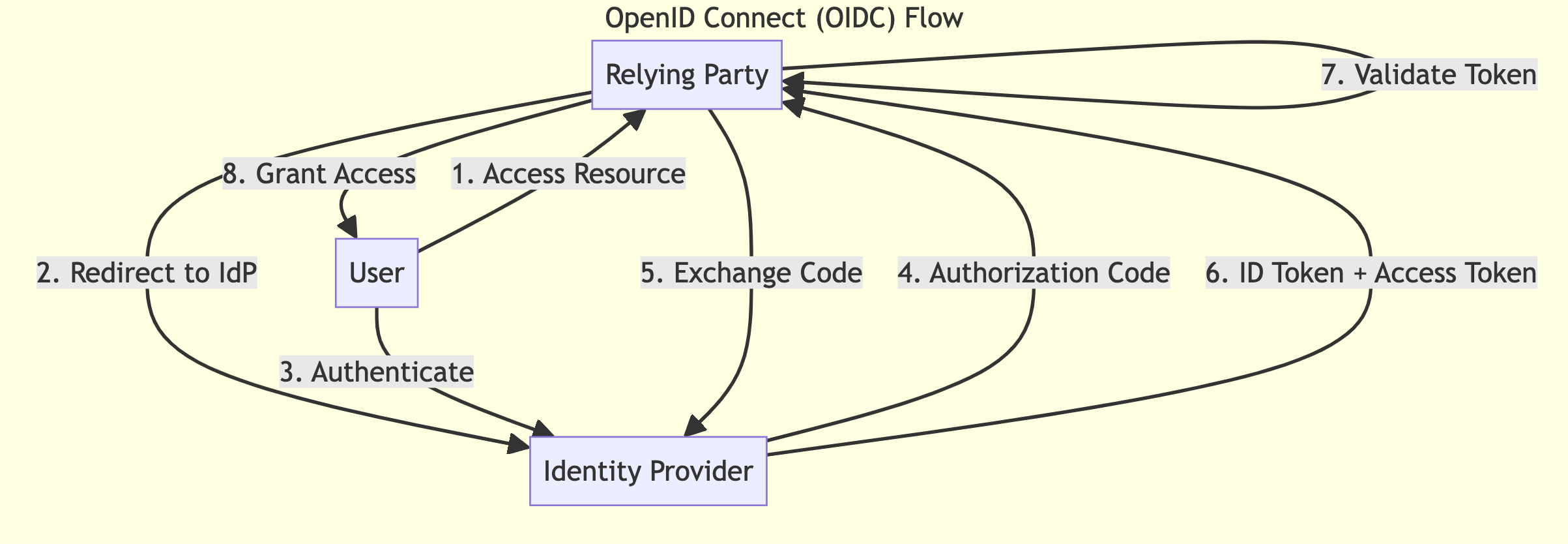
  1. The user attempts to access a protected resource on the RP.
  2. The RP redirects the user to the IdP for authentication.
  3. The user authenticates with the IdP.
  4. The IdP issues an authorization code to the RP.
  5. The RP exchanges the code for an ID token and, optionally, an access token.
  6. The RP validates the ID token and extracts user information.
  7. (Optional) The RP uses the access token to request additional user information from the UserInfo endpoint.
OIDC vs SAML: A Comprehensive Technical Comparison
How does OIDC works

Security Assertion Markup Language (SAML)

SAML is an XML-based open standard for exchanging authentication and authorization data between parties, specifically between an Identity Provider and a Service Provider.

Key Components

  • Identity Provider (IdP): Authenticates users and issues SAML assertions.
  • Service Provider (SP): The application relies on the IdP for authentication.
  • SAML Assertion: An XML document containing claims about the authentication event and user.
  • Metadata: XML documents describing the configuration of SAML entities.

Flow

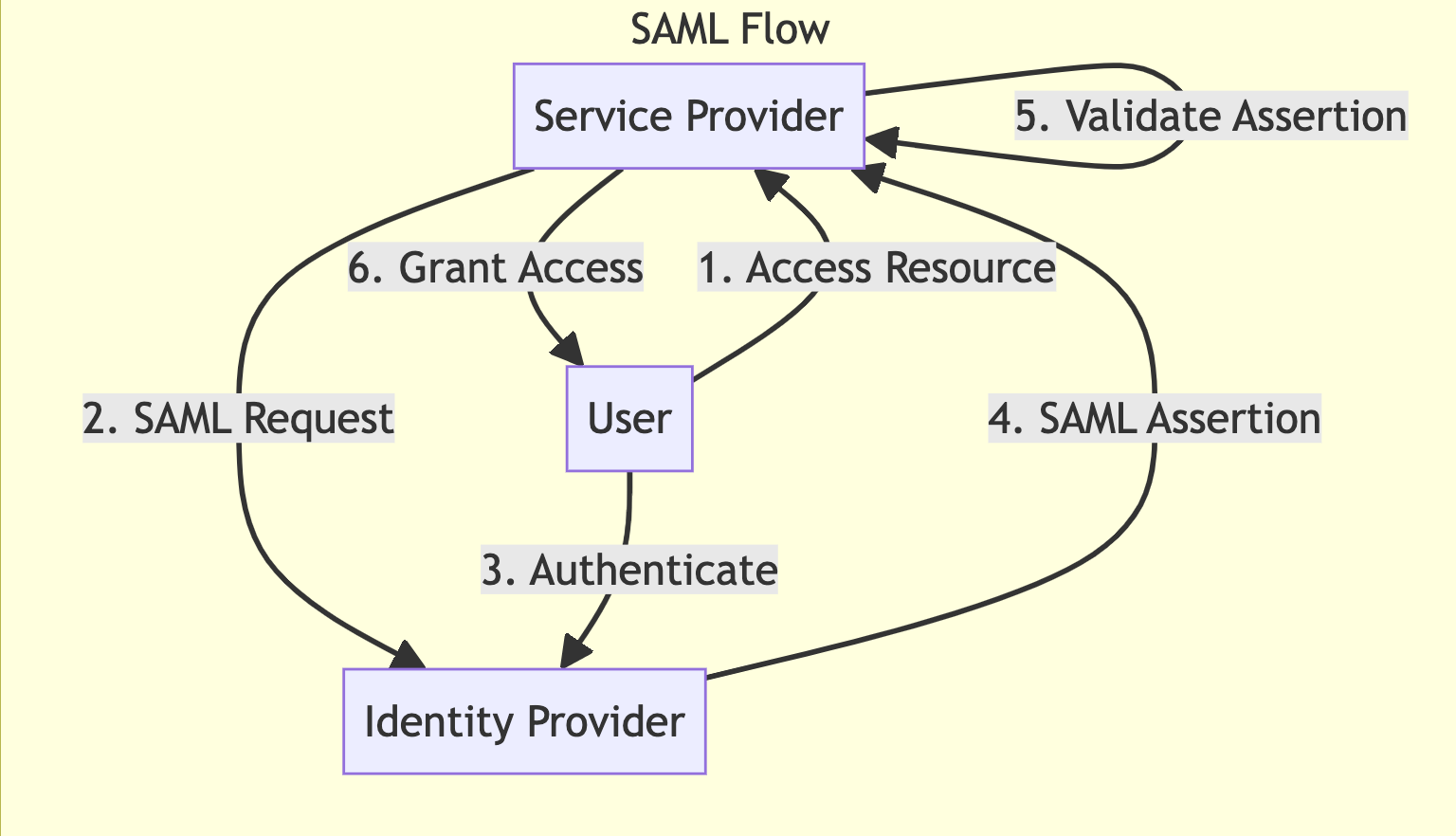
  1. The user attempts to access a protected resource on the SP.
  2. The SP generates a SAML authentication request and redirects the user to the IdP.
  3. The user authenticates with the IdP.
  4. The IdP generates a SAML assertion and returns it to the SP via the user's browser.
  5. The SP validates the SAML assertion and extracts user information.
  6. The SP grants access to the protected resource.
OIDC vs SAML: A Comprehensive Technical Comparison
How does SAML works

Key Differences

Protocol and Format

  • OIDC: Built on OAuth 2.0, uses JSON/JWT for tokens and claims.
  • SAML: Standalone protocol, uses XML for assertions and metadata.

Complexity

  • OIDC: Generally simpler to implement and understand, especially for developers familiar with OAuth 2.0.
  • SAML: More complex, with a steeper learning curve due to its XML-based nature and more extensive specification.

Token Format

  • OIDC: Uses compact, URL-safe JWTs which can be easily parsed and validated.
  • SAML: Uses XML-based assertions which are more verbose but potentially more expressive.

Discovery and Metadata

  • OIDC: Provides dynamic discovery of IdP metadata via well-known URIs.
  • SAML: Typically requires manual exchange of metadata XML files.

Mobile and Native App Support

  • OIDC: Better suited for mobile and native applications due to its JSON-based nature.
  • SAML: Primarily designed for web applications, can be challenging to implement in mobile environments.

Key Use Cases

OIDC Use Cases

  1. Single Sign-On for Consumer Applications: Ideal for consumer-facing apps that need to integrate with social login providers.
  2. Mobile and Native Applications: Better suited for mobile environments due to its lightweight nature.
  3. API Authentication: Can be used to secure APIs in conjunction with OAuth 2.0.
  4. Microservices Architecture: Well-suited for service-to-service authentication in microservices environments.

SAML Use Cases

  1. Enterprise Single Sign-On: Widely adopted in enterprise environments for web-based SSO.
  2. Federated Identity Management: Excellent for scenarios where organizations need to share identity information across trust boundaries.
  3. Government and Healthcare Sectors: Often preferred in highly regulated industries due to its maturity and extensive security features.
  4. Education Sector: Commonly used in academic environments for federated access to research resources.

Integration with Authentication and Authorization Systems

Both OIDC and SAML can be integrated with various authentication and authorization systems. Here's how:

OIDC Integration

  1. Authentication Systems:
    • Implement the OIDC IdP role in your existing authentication system.
    • Expose the necessary OIDC endpoints (authorization, token, userinfo, etc.).
    • Generate and sign JWTs for ID tokens.
  2. Authorization Systems:
    • Use the OAuth 2.0 scopes mechanism to define and enforce access controls.
    • Implement token introspection for validating access tokens.
    • Use JWT claims for fine-grained authorization decisions.

SAML Integration

  1. Authentication Systems:
    • Implement the SAML IdP role in your existing authentication system.
    • Generate SAML assertions with the necessary attributes and claims.
    • Implement SAML endpoints for receiving authentication requests and sending responses.
  2. Authorization Systems:
    • Use SAML attributes in the assertion for making authorization decisions.
    • Implement XACML (eXtensible Access Control Markup Language) for more complex authorization scenarios.
    • Use SAML attribute queries for fetching additional user attributes for authorization.

Common Integration Patterns

  1. Bridging: Implement both OIDC and SAML support in your system to cater to different client requirements.
  2. Token Translation: Convert between SAML assertions and OIDC tokens to support legacy systems.
  3. Federation: Use either protocol to establish trust relationships between different organizations or domains.
  4. Multi-Factor Authentication: Extend both protocols to support additional authentication factors.

Conclusion

Both OIDC and SAML are robust protocols for identity federation and single sign-on. OIDC, with its simplicity and mobile-friendliness, is often preferred for modern, consumer-facing applications. SAML, with its maturity and extensive feature set, remains a strong choice for enterprise environments and sectors with stringent security requirements.

The choice between OIDC and SAML often depends on specific use cases, existing infrastructure, and client requirements. Many organizations choose to support both protocols to maximize flexibility and interoperability. Regardless of the chosen protocol, proper implementation and security best practices are crucial for maintaining a robust identity and access management system.

https://bit.ly/4bGTsOu
https://bit.ly/45ZGv13


https://2.gravatar.com/avatar/b7ed20e10da488de193e75b40fa28ba5ceda96c4265525794861ddaa33ae7723?s=96&d=identicon&r=G
https://deepakguptaplus.wordpress.com/2024/07/11/oidc-vs-saml-a-comprehensive-technical-comparison/


Monday, July 8, 2024

Mastering Efficient Data Processing for LLMs, Generative AI, and Semantic Search

Mastering Efficient Data Processing for LLMs, Generative AI, and Semantic Search

In modern AI applications, efficient data processing isn't just a desirable feature—it's a necessity. These advanced AI applications are reshaping industries, from natural language processing to content creation and information retrieval. Large Language Models (LLMs), generative AI models, and semantic search engines are all data-hungry beasts, and their performance is heavily reliant on the speed and efficiency with which they can access and process information.

However, their power comes at a cost: the need for efficient and scalable data processing pipelines. In this comprehensive guide, we'll explore cutting-edge techniques and strategies to optimize data processing for these AI-powered applications, focusing on leveraging vector databases, data compression, parallelization, and caching.

Understanding the Data Processing Challenges

Before diving into optimization techniques, it's crucial to understand the unique challenges posed by LLMs, generative AI, and semantic search:

a) Massive Data Volumes: LLMs are trained on enormous datasets, often comprising hundreds of gigabytes or even terabytes of text.

b) High-Dimensional Embeddings: Semantic search and many LLM applications rely on high-dimensional vector representations of text, which can be computationally expensive to process and store.

c) Real-time Requirements: Many applications, especially in semantic search, require near-instantaneous responses, putting pressure on processing pipelines.

d) Continuous Learning: Some systems need to update their knowledge base in real-time, necessitating efficient incremental processing.

Key Strategies for Efficient Data Processing

  1. Vector Databases
  2. Data Compression
  3. Parallel Processing
  4. Caching
  5. Hardware Acceleration
  6. Optimize Algorithms
  7. Data Cleaning and Preprocessing
  8. Continuous Optimization
  9. Optimizing for Specific Use Case

1. Leveraging Vector Databases

Vector databases have emerged as a crucial tool for managing high-dimensional embeddings efficiently. Here's how to make the most of them:

a) Choosing the Right Vector Database

  • FAISS (Facebook AI Similarity Search): Excellent for large-scale similarity search and clustering.
  • Milvus: An open-source vector database with strong scalability and ease of use.
  • Pinecone: A fully managed vector database service with advanced features like hybrid search.

b) Indexing Strategies

  • Implement Approximate Nearest Neighbor (ANN) algorithms like HNSW (Hierarchical Navigable Small World) for faster similarity search.
  • Use Product Quantization (PQ) to compress vectors while maintaining search quality.

c) Sharding and Distributed Processing

  • Implement horizontal sharding to distribute vector data across multiple nodes.
  • Use consistent hashing for efficient data distribution and retrieval.

Example Python code snippet using FAISS for efficient similarity search:

import faiss
import numpy as np

# Assume we have a set of embeddings
embeddings = np.random.random((100000, 128)).astype('float32')

# Create an index
index = faiss.IndexFlatL2(128)

# Add vectors to the index
index.add(embeddings)

# Perform a search
query = np.random.random((1, 128)).astype('float32')
k = 5  # number of nearest neighbors
D, I = index.search(query, k)

print(f"Distances: {D}")
print(f"Indices: {I}")

2. Data Compression Techniques

Efficient data compression is vital for managing large datasets and reducing storage and transmission costs:

a) Quantization

  • Scalar quantization: Reduce the precision of floating-point numbers.
  • Vector quantization: Represent groups of vectors with a smaller set of centroids.

b) Dimensionality Reduction

  • Principal Component Analysis (PCA): Reduce the dimensionality of embeddings while preserving most of the information.
  • Random Projection: A computationally efficient alternative to PCA for high-dimensional data.

c) Sparse Encoding

  • Implement sparse representations for text data, such as bag-of-words or TF-IDF.

Example of dimensionality reduction using PCA:

from sklearn.decomposition import PCA
import numpy as np

# Assume we have high-dimensional embeddings
embeddings = np.random.random((10000, 768))

# Initialize PCA
pca = PCA(n_components=128)

# Fit and transform the data
reduced_embeddings = pca.fit_transform(embeddings)

print(f"Original shape: {embeddings.shape}")
print(f"Reduced shape: {reduced_embeddings.shape}")

3. Parallel Processing

Leveraging parallel processing can significantly speed up data processing pipelines:

a) Data Parallelism

  • Distribute data across multiple nodes or GPUs for parallel processing.
  • Implement map-reduce paradigms for large-scale data processing.

b) Model Parallelism

  • For large LLMs, distribute different layers of the model across multiple GPUs.

c) Pipeline Parallelism

  • Implement a pipeline where different stages of processing occur simultaneously on different data batches.

Example using Python's multiprocessing for parallel data processing:

from multiprocessing import Pool
import numpy as np

def process_chunk(chunk):
    # Assume this is a computationally intensive operation
    return np.mean(chunk, axis=0)

# Create a large dataset
data = np.random.random((1000000, 100))

# Split the data into chunks
chunks = np.array_split(data, 10)

# Process in parallel
with Pool(processes=4) as pool:
    results = pool.map(process_chunk, chunks)

# Combine results
final_result = np.mean(results, axis=0)

4. Caching

Implementing effective caching can dramatically reduce computation time for frequently accessed data:

a) In-memory Caching

  • Use libraries like Redis or Memcached for fast, in-memory caching of frequently accessed embeddings or search results.

b) Disk-based Caching

  • Implement LRU (Least Recently Used) caching for larger datasets that don't fit in memory.

c) Predictive Caching

  • Use machine learning models to predict and pre-cache likely queries or data accesses.

Example of implementing a simple LRU cache:

from functools import lru_cache

@lru_cache(maxsize=1000)
def compute_embedding(text):
    # Assume this is a computationally expensive operation
    # In reality, this would involve calling an LLM or embedding model
    return hash(text)

# First call will compute the embedding
result1 = compute_embedding("Hello, world!")

# Second call will retrieve from cache
result2 = compute_embedding("Hello, world!")

print(f"Result 1: {result1}")
print(f"Result 2: {result2}")

5. Hardware Acceleration

Leveraging specialized hardware can dramatically improve processing speed and efficiency:

a) GPU Acceleration

  • Utilize NVIDIA GPUs with CUDA for parallel processing of large matrices and vectors.
  • Implement libraries like cuBLAS for GPU-accelerated linear algebra operations.

b) TPU (Tensor Processing Units)

  • For large-scale deployments, consider using Google's TPUs, which are specifically designed for machine learning workloads.

c) FPGA (Field-Programmable Gate Arrays)

  • Implement custom hardware accelerators for specific, repetitive tasks in your pipeline.

Example of using GPU acceleration with PyTorch:

import torch

# Check if CUDA is available
device = torch.device("cuda" if torch.cuda.is_available() else "cpu")
print(f"Using device: {device}")

# Create a large tensor
x = torch.randn(10000, 10000, device=device)

# Perform a matrix multiplication
result = torch.matmul(x, x.t())

print(f"Result shape: {result.shape}")

6. Optimize Algorithms

Implementing efficient algorithms can significantly reduce computational complexity:

a) Approximate Nearest Neighbor (ANN) Algorithms

  • Use algorithms like HNSW (Hierarchical Navigable Small World) or NSG (Navigable Spreading-out Graph) for faster similarity search.

b) Efficient Tokenization

  • Implement BPE (Byte Pair Encoding) or SentencePiece for faster and more efficient tokenization of text data.

c) Pruning Techniques

  • For LLMs, implement model pruning techniques to reduce model size without significant loss in performance.

Example of using HNSW for approximate nearest neighbor search:

import hnswlib
import numpy as np

# Generate sample data
dim = 128
num_elements = 100000

# Generating sample data
data = np.random.rand(num_elements, dim).astype('float32')

# Declaring index
p = hnswlib.Index(space='l2', dim=dim)

# Initializing index
p.init_index(max_elements=num_elements, ef_construction=200, M=16)

# Adding data points
p.add_items(data)

# Searching
k = 3
query_data = np.random.rand(1, dim).astype('float32')
labels, distances = p.knn_query(query_data, k=k)

print(f"Labels of {k} nearest neighbors: {labels}")
print(f"Distances to {k} nearest neighbors: {distances}")

7. Data Cleaning and Preprocessing

Effective data preparation is crucial for optimal performance:

a) Text Normalization

  • Implement Unicode normalization, lowercasing, and special character handling.

b) Deduplication

  • Remove duplicate or near-duplicate entries to reduce data size and improve model quality.

c) Intelligent Sampling

  • For very large datasets, implement stratified sampling to maintain data distribution while reducing size.

Example of text preprocessing using Python:

import re
import unicodedata
from nltk.corpus import stopwords
from nltk.tokenize import word_tokenize

def preprocess_text(text):
    # Lowercase the text
    text = text.lower()
    
    # Normalize Unicode characters
    text = unicodedata.normalize('NFKD', text).encode('ascii', 'ignore').decode('utf-8')
    
    # Remove special characters and digits
    text = re.sub(r'[^a-zA-Z\s]', '', text)
    
    # Tokenize the text
    tokens = word_tokenize(text)
    
    # Remove stopwords
    stop_words = set(stopwords.words('english'))
    tokens = [token for token in tokens if token not in stop_words]
    
    return ' '.join(tokens)

# Example usage
raw_text = "Hello, world! This is an example of text preprocessing. 123 @#$%"
processed_text = preprocess_text(raw_text)
print(f"Processed text: {processed_text}")

8. Continuous Optimization

Implement systems for ongoing performance improvement:

a) A/B Testing

  • Continuously test different processing strategies and model configurations.

b) Automated Hyperparameter Tuning

  • Use libraries like Optuna or Ray Tune for automated optimization of processing parameters.

c) Performance Monitoring

  • Implement comprehensive logging and monitoring to identify bottlenecks and optimization opportunities.

Example of hyperparameter tuning with Optuna:

import optuna

def objective(trial):
    # Define the hyperparameters to optimize
    n_estimators = trial.suggest_int('n_estimators', 100, 1000)
    max_depth = trial.suggest_int('max_depth', 1, 30)
    min_samples_split = trial.suggest_int('min_samples_split', 2, 100)
    
    # Create and train your model with these hyperparameters
    model = RandomForestClassifier(n_estimators=n_estimators, 
                                   max_depth=max_depth,
                                   min_samples_split=min_samples_split)
    model.fit(X_train, y_train)
    
    # Return the metric to optimize
    return model.score(X_test, y_test)

# Create a study object and optimize the objective function
study = optuna.create_study(direction='maximize')
study.optimize(objective, n_trials=100)

print('Number of finished trials:', len(study.trials))
print('Best trial:')
trial = study.best_trial
print('  Value: ', trial.value)
print('  Params: ')
for key, value in trial.params.items():
    print('    {}: {}'.format(key, value))

9. Optimizing for Specific Use Case

a) LLMs

  • Implement efficient tokenization and batching strategies.
  • Use quantization techniques to reduce model size and inference time.

b) Generative AI

  • Implement beam search with early stopping for faster text generation.
  • Use caching for partial results in iterative generation processes.
  • Implement hybrid search combining vector similarity with traditional keyword-based methods.
  • Use hierarchical clustering for efficient search space pruning.

Conclusion

Mastering efficient data processing for LLMs, generative AI, and semantic search requires a multifaceted approach. By implementing advanced techniques such as vector databases, data compression, parallelization, and caching, and complementing them with hardware acceleration, optimized algorithms, thorough data preprocessing, and continuous optimization, you can create highly efficient and scalable AI-powered applications.

The key to success lies not just in implementing these strategies individually, but in finding the right balance and combination that works for your specific use case. Continuous monitoring, testing, and optimization are crucial in this rapidly evolving field.

As AI technologies continue to advance, staying informed about the latest developments in data processing techniques will be essential. By leveraging these cutting-edge strategies, you can push the boundaries of what's possible with AI, creating applications that are not only powerful and innovative but also efficient and responsive.

Remember, the goal is not just to process data faster, but to do so in a way that enables new possibilities and insights. With these advanced techniques at your disposal, you're well-equipped to tackle the challenges of building next-generation AI applications.

https://bit.ly/4cMQD01
https://bit.ly/3VUozAy


https://2.gravatar.com/avatar/b7ed20e10da488de193e75b40fa28ba5ceda96c4265525794861ddaa33ae7723?s=96&d=identicon&r=G
https://deepakguptaplus.wordpress.com/2024/07/09/mastering-efficient-data-processing-for-llms-generative-ai-and-semantic-search/

Monday, June 24, 2024

Passkeys: The Future of Passwordless Authentication

Passkeys: The Future of Passwordless Authentication

Passwords have long been the curse of cybersecurity, with weak credentials representing the leading avenue for data breaches and account takeovers. However, emerging passwordless authentication standards aim to secure online identities far more effectively using cryptographic passkeys. This guide examines what passkeys are, how they improve security, and considerations for their broad implementation.

Introducing Passkeys

A passkey serves as a passwordless digital credential used to confirm an online user's identity. Instead of manually entered text passwords, passkeys rely on public key cryptography to facilitate login. Your device creates the passkey credential tied specifically to you and exchanges this securely with the authenticating service to prove your identity.

Passkeys strengthen security by eliminating:

  • Weak, reused, and leaked passwords exposed in breaches
  • Phishing risks from tricking users into entering passwords
  • Possible interception of unencrypted passwords sent over networks

They provide the benefits of multi-factor authentication without SMS codes or authenticator apps that still rely on fallible passwords as one factor. With widespread adoption, passkeys can largely replace passwords over time for stronger, faster authentication using advanced cryptography.

How Passkeys Work

Built according to the FIDO (Fast Identity Online) Alliance and W3C Web Authentication standards, passkeys use public and private key pairs for login:

  1. Users register a passkey for a website by creating a new asymmetric cryptography key pair and sending the public key to the site
  2. The private key stays securely stored on the user's device
  3. On login, the website uses the public key stored for that user to challenge the device
  4. The device signs the challenge with the corresponding private key, securely proving the identity
  5. The user is authenticated seamlessly without any passwords required

This encrypted exchange verifies users' identities without exposing vulnerable credentials that could be phished or intercepted. Factory reset wipes passkeys from a lost device while allowing simple re-enrollment from other still-trusted devices.

Early Real-World Passkey Implementations

While web and device authentication standards were established years ago, platforms and browsers now actively build support:

Passkey capabilities are still limited on older operating systems. But users can start creating and syncing passkeys across Apple or Google ecosystems today for robust passwordless access to supporting websites. Over time, this spreads to become the default for authentication across desktop and mobile.

Passkey Security and Storage

Passkeys provide far greater security than traditional passwords and are easily stolen. Private keys remain securely encrypted within platform-specific hardware-backed key stores:

  • iOS/iPadOS/macOS – Passkeys stored only in the Secure Enclave chip with strict access controls
  • Android – Keystore subsystem leverages Trusted Execution Environment for hardware-backed storage and use
  • Windows 11 – Uses Pluton-based TPM and Secure Encrypted Virtualization for passkey operations

On Apple, in particular, passkeys stored within the Secure Enclave can only be exported to other trusted nearby Apple devices through end-to-end encryption for syncing and backup. Servers receive only public keys during registration. The private keys never leave users' devices.

This hardware-backed security makes passkeys resilient to phishing, leaks, credential stuffing, and even server database compromises that expose password hashes. Without access to your physical device, the private key remains inaccessible.

Additionally, public keys can be restricted to specific device characteristics like Trusted Platform Module fingerprints and IP addresses. This binds keys to your device environment only for anti-theft protection.

Considerations for Enterprise Adoption

For businesses, migrating from legacy passwords presents challenges:

  • Compatibility – Passkeys don't work on outdated operating systems lacking platform support. Certain users would need excluded access.
  • Federating authentication – Synchronizing passkeys across non-federated directories is complex. Modern identity protocols like OIDC help.
  • Backup and recovery – Device failures can restrict access since passkeys are hardware-bound. Allowing user-controlled secure external encrypted backups is advisable where permitted by platforms.
  • Layered authentication – Passkeys should augment broader identity frameworks with adaptive and contextual authentication, not fully replace them immediately. Gradual steps help.

Overall, though, for a stronger security posture, enterprises should begin planning migration roadmaps from legacy passwords to passkey support over time. The user experience and authentication speed improvements can be dramatic.

Potential Passkey Weaknesses

While far more secure than passwords, passkeys also come with considerations:

  • User education – Effectiveness requires user understanding of risks like device theft and concepts like key synchronization.
  • Device dependence – Losing access to devices can temporarily lock users out unless they have spares registered.
  • Lack of secrets – Passkeys avoid human secrets, but vigilance is still imperative around physical device security.
  • Narrow initial adoption – Limited platform and site support today reduces usability, slowing the displacement of passwords.
  • Privileged access risks – Safeguards for administrative or backup access must be weighed carefully by providers.

The widespread trust in passwords persists from familiarity. But over the long term, passkeys can overcome these barriers to become faster, stronger identity credentials, improving individual and enterprise cyber protection.

Conclusion on Passkey Potential

Passkeys herald the beginning of the end for antiquated password insecurity – directly addressing the most prominent threat vector across consumer and enterprise spheres. As more platforms and websites enable support over the next coming years, passkeys can start securely authenticating our digital experiences – from unlocking computers and phones to accessing email, shopping online, and beyond without passwords ever crossing the internet.

Adoption remains narrow but will accelerate as understanding, infrastructure, and standardization spread. Ultimately, by replacing weak static secrets, cryptographic passkeys can help realize the passwordless future essential to greater security and privacy online long into the future.

https://ift.tt/eoNTKYV
https://ift.tt/60ThFPe


https://2.gravatar.com/avatar/b7ed20e10da488de193e75b40fa28ba5ceda96c4265525794861ddaa33ae7723?s=96&d=identicon&r=G
https://deepakguptaplus.wordpress.com/2024/06/24/passkeys-the-future-of-passwordless-authentication/

Wednesday, June 19, 2024

The Distributed Workforce: Why Flexibility and Trust are Essential in Cybersecurity

The Distributed Workforce: Why Flexibility and Trust are Essential in Cybersecurity

As a tech company founder, I firmly believe that the most effective and future-proof teams are those given the flexibility and trust to thrive in a distributed, remote environment. The world is now one massive online ecosystem, and our work as cybersecurity professionals must mirror that reality.

The future of cybersecurity demands more than cutting-edge technology – it demands adaptability. As a cybersecurity founder, I believe building flexibility and trust into our teams is a strategic advantage, not just a perk. A distributed workforce allows us to secure a globally connected world. It widens our talent pool, accelerates innovation, and increases our vigilance on a 24/7 basis. The pandemic proved that remote teams are not only possible but can often be more effective. By fostering a culture of responsibility, clear communication, and proactive security measures, we create the kind of agility and resilience needed to face the unknown in our field.

Here's why:

  • Talent transcends geography. Expertise is no longer confined by borders. A flexible work model lets us tap into the best minds in the field, regardless of their location. This means an exponentially wider pool of potential rockstars for our teams.
  • A new work-life dynamic. The pandemic solidified the shift toward desiring greater control over where and when we work. When we honor employees' need for this balance, they become more engaged, loyal, and productive.
  • Security knows no time zones. Cyber threats don't operate on a 9-to-5 schedule. A globally distributed team lets us create a 'follow the sun' security model for 24/7 vigilance. We can also leverage diverse time zones to speed up development and solution cycles.
  • The evolution of collaboration tools. Technology has finally caught up. The proliferation of video conferencing, real-time collaboration platforms, and secure file-sharing has made remote work seamless without compromising communication or data security.

Recent Examples That Prove This Model Works:

  • The 'Zero Trust' revolution. Zero Trust security frameworks assume everyone and everything is a potential threat, even within the network. This mindset mirrors a distributed workforce – trusting people rather than locations is essential for success.
  • Increased resilience during crises. When the pandemic hit, companies with existing remote-friendly structures weathered the storm far better. Their security teams didn't miss a beat, and business continuity was maintained.
  • Cloud-based security growth. The boom in SaaS cybersecurity solutions highlights the inherent agility of cloud-based, distributed technologies. These technologies are designed to protect a model where data and people aren't centrally located.

Of course, flexibility doesn't mean relinquishing control. Key principles must underpin this shift:

  • Culture as the core. Focus on outcomes, not work hours. Trustworthiness and a 'security-first' mindset must be embedded deeply within your company's DNA.
  • Robust infrastructure. Invest in top-notch secure collaboration tools, remote access systems, and employee training on secure work practices.
  • Proactive communication. Regular check-ins, team-building exercises, and remote celebrations of wins are vital to keeping a sense of camaraderie alive across distances.

The future of cybersecurity is distributed. By embracing flexibility now, we build teams that are happier, more productive, and uniquely ready to face the ever-evolving challenges of securing a borderless world.

  • Empowering innovation: Rigid structures stifle creativity. When people have the autonomy to work when and how they work best, they're more likely to come up with breakthrough ideas. This is crucial in a lightning-fast field like cybersecurity.
  • Attracting (and retaining) diverse talent: A flexible approach appeals to underrepresented groups like parents, those with disabilities, or people navigating other responsibilities. A diverse team equals diverse perspectives – a superpower for identifying and overcoming cybersecurity blind spots.
  • The well-being factor: Stress and burnout are rampant in cybersecurity. Prioritizing flexibility shows genuine care for our people. A mentally healthy team is sharper, more vigilant, and more able to think like a potential attacker.
  • Agility in the face of the unknown: Cybersecurity is the ultimate field where adaptability is paramount. A workforce accustomed to working remotely and independently has a built-in ability to react quickly, problem-solve creatively, and pivot with the next unforeseen vulnerability.

It's not just a 'nice to have' – it's about survival

Ultimately, I believe those cybersecurity companies that cling to the old office-centric model will begin to struggle. They'll find themselves competing for a shrinking talent pool while operating with less innovative and less resilient teams.

Flexibility isn't about 'letting people slack off'. It's about respecting their ability to manage their own time responsibly while delivering quality work and protecting our most crucial assets. Trust is at the heart of this, but it's a calculated and intelligent trust backed up by the right cultural values, tools, and communication.

https://bit.ly/3XvnEsx
https://bit.ly/3VxypYF


https://2.gravatar.com/avatar/b7ed20e10da488de193e75b40fa28ba5ceda96c4265525794861ddaa33ae7723?s=96&d=identicon&r=G
https://deepakguptaplus.wordpress.com/2024/06/19/the-distributed-workforce-why-flexibility-and-trust-are-essential-in-cybersecurity/

Monday, June 17, 2024

Open Source Licensing 101: Everything You Need to Know

Open Source Licensing 101: Everything You Need to Know

Open-source software has revolutionized the tech industry, fostering collaboration, innovation, and accessibility. At the heart of this movement lies open-source licensing – a legal framework that governs the use, modification, and distribution of software code. Understanding these licenses is crucial for both developers creating open-source projects and users incorporating them into their own work.

Why Open Source Licensing Matters

Open-source licenses aren't just legal jargon; they are the backbone of the open-source ecosystem. They define the rights and obligations of both creators and users, ensuring that the software remains accessible, collaborative, and aligned with the principles of openness and sharing.

  • For developers, choosing the right license is essential to protecting their work, defining how it can be used, and encouraging or restricting certain activities.
  • For users, understanding licenses is crucial to ensure compliance, avoid legal pitfalls, and make informed decisions about which software to use.

Types of Open Source Licenses

Open source licenses can be broadly categorized into two main types:

  1. Permissive Licenses

Permissive licenses offer the most freedom to users. They allow the software to be used, modified, and distributed for any purpose, including commercial use, with minimal restrictions. The main requirement is usually to give credit to the original authors.

  • Common Permissive Licenses:
    • MIT License: This license is widely used for its simplicity and permissiveness. It requires only the inclusion of the original copyright and license notice.
    • Apache License 2.0: Similar to MIT but includes a patent license grant, providing additional protection against patent infringement claims.
    • BSD Licenses: (Simplified BSD, FreeBSD, etc.) Similar to MIT but with additional clauses regarding advertising and redistribution.
  • Use Cases: Permissive licenses are ideal for projects that aim to encourage widespread adoption and commercial use, such as libraries, frameworks, and tools.
  1. Copyleft Licenses

Copyleft licenses impose stricter conditions on the use and distribution of open-source software. They require that any modified versions of the software be released under the same license, thus preserving the open-source nature of the work.

  • Common Copyleft Licenses:
    • GNU General Public License (GPL): The most well-known copyleft license, ensuring that the software and its derivatives remain free and open source.
    • GNU Lesser General Public License (LGPL): This is a less restrictive copyleft license that allows linking to non-GPL software. It is often used for libraries.
    • Mozilla Public License (MPL): A balanced license that allows for commercial use but requires that modifications to the original code be shared under the same license.
  • Use Cases: Copyleft licenses are often used for projects where maintaining the open-source nature of the work is a priority, such as operating systems, applications, and platforms.

Understanding Key License Terms

Let's break down some essential terms you'll encounter in open-source licenses:

  • Attribution: Most licenses require you to give credit to the original authors of the software. This typically involves including a copyright notice and a copy of the license in your project.
  • Commercial Use: Permissive licenses generally allow commercial use, while copyleft licenses may have restrictions or require that modified versions be released under the same license.
  • Distribution: Refers to how you can share the software. Some licenses allow unrestricted distribution, while others may require you to share the source code if you distribute modifications.
  • Modification: Defines how you can change the software. Permissive licenses typically allow modifications without restrictions, while copyleft licenses may require you to share the modified code under the same license.
  • Patent Grant: Some licenses, like the Apache License 2.0, include a patent license grant, allowing you to use any patents that may be infringed by using the software.
  • Warranty Disclaimer: Most open-source licenses disclaim any warranty or liability for the software. This means you use the software at your own risk.

1. MIT License:

The MIT License is one of the most straightforward and permissive open-source licenses. It grants users broad rights to use, modify, and distribute the software, even for commercial purposes.

How to Use: Since the MIT License allows for commercial use, you can incorporate the software into your own product or service and sell it without any restrictions. You only need to include the original copyright and license notice with your distribution.

2. Apache License 2.0:

The Apache License 2.0 is another popular permissive license that offers similar freedoms as the MIT License. It also includes a patent grant, providing additional protection against patent infringement claims.

How to Use: You can use Apache-licensed software in your commercial products or services without any restrictions. You need to include the original copyright and license notice, as well as any modifications you've made.

3. GNU General Public License (GPL):

The GNU General Public License (GPL) is a strong copyleft license that protects users' freedom to use, study, share, and modify software.

How to Use: If you use GPL-licensed software, you must make the source code available to anyone who receives it, even if you sell it. You must also allow them to modify and redistribute the software under the same GPL terms.

4. GNU Lesser General Public License (LGPL) 3.0:

The LGPL 3.0 is a "weaker" copyleft license compared to the GPL. It allows you to link your proprietary software to LGPL-licensed libraries without having to release your entire codebase under the LGPL.

How to Use: You can incorporate LGPL-licensed libraries into your proprietary software and sell it. However, you must make the library's source code available to your customers and allow them to modify it. You also need to ensure that any changes you make to the library are released under the LGPL.

5. Mozilla Public License (MPL) 2.0:

The MPL 2.0 is a balanced license that allows for commercial use but requires that modifications to the original source code be shared under the same license.

How to Use: You can use MPL-licensed software in your commercial product, but you must make the source code of any files you modify available under the MPL. This allows other developers to benefit from your changes.

6. Eclipse Public License 2.0 (EPL 2.0)

The Eclipse Public License 2.0 (EPL 2.0) is a business-friendly open-source license designed to facilitate commercial adoption while still promoting collaboration and contribution to the open-source community.

How to Use: If you modify an EPL-licensed module and distribute that modified module, you must make the source code of your modifications available under EPL 2.0.

7. AGPL V3

The GNU Affero General Public License version 3 (AGPLv3) is a strong copyleft license designed for software offered over a network.

How to Use: If you modify AGPLv3 software and make it available to others over a network, you must also make your source code modifications available to those users.

8. BSD 3 License

BSD (Berkeley Source Distribution) licenses are a family of permissive free software licenses. It allows you to freely use, modify, and distribute software, even for commercial purposes, with minimal restrictions.

How to Use: The main requirement is to include the original copyright notice and the license text in your distribution. You are not obligated to share modifications or source code.

Key Considerations When Selling Open Source Software:

  • Dual Licensing: Some projects offer dual licensing, allowing you to choose between a free, open-source license and a commercial license. This gives you the flexibility to cater to different customer needs.
  • Value-Added Services: Instead of selling the software itself, you can offer value-added services like support, training, or customization. This is a standard model for open-source companies.
  • Open Core: This model involves offering a core open-source product with additional proprietary features or modules that you can sell.
  • Subscriptions: You can offer subscriptions for premium features, updates, or support services related to the open-source software.

By understanding the nuances of different open-source licenses and exploring various business models, you can leverage open-source software to create profitable products and services while contributing to the open-source community.

Choosing the Right License

Selecting the proper open-source license is a critical decision that depends on your project's goals and the level of control you want to maintain over its use. Consider the following factors:

  • Project Goals: What are your objectives for the project? Do you want to encourage widespread adoption, commercial use, or community contributions?
  • Target Audience: Who will be using your software? Are they individuals, businesses, or other developers?
  • License Compatibility: If you are integrating with other open-source software, ensure that the licenses are compatible.

Use Cases and Requirements

Let's explore some common scenarios and the suitable licenses for each:

  • Open-Source Project: If you are creating an open-source project that you want others to use, modify, and distribute freely, a permissive license like MIT or Apache 2.0 is a good choice.
  • Library or Framework: For libraries or frameworks that you want to be integrated into other projects, including proprietary ones, consider the LGPL or MPL. These licenses allow for integration without requiring the entire project to be open source.
  • Protecting Community Contributions: If you want to ensure that any modifications to your software are also shared with the community, a copyleft license like GPL is suitable.
  • Commercial Product: If you are creating a commercial product based on open-source software, a permissive license like MIT or Apache 2.0 gives you the flexibility to sell your product without restrictions.

Additional Considerations

  • Dual Licensing: Some projects offer dual licensing, where the software can be used under multiple licenses (e.g., GPL or a commercial license). This gives users more flexibility in how they use the software.
  • Compatibility: If your project integrates with other open-source software, ensure that the licenses are compatible. Some licenses, like GPL, have stricter requirements than others.
  • Legal Counsel: For complex projects or commercial use cases, seek legal advice to ensure proper compliance with the chosen license.

Things to Watch for When Using Open Source Projects

When incorporating open-source software into your own project, be mindful of the following:

  • License Compatibility: Ensure that the licenses of all the open-source components you use are compatible with each other.
  • Attribution Requirements: Carefully follow the attribution requirements of each license, including providing copyright notices and license texts.
  • Modified Code: If you modify open-source code, understand the license's requirements regarding the distribution of the modified code.
  • Legal Compliance: Ensure that your use of open-source software complies with all applicable laws and regulations.

Example: Choosing a License for a Security Software

You've created an innovative open-source software solution for securing back-end infrastructure. It includes tools for vulnerability scanning, intrusion detection, and threat intelligence. Your goal is to make it widely adopted by businesses and organizations of all sizes while also allowing for potential commercial opportunities.

License Considerations:

  • Widespread Adoption: You want the open-source to be easily integrated into various environments, including proprietary software stacks. A permissive license is preferable, as it won't restrict its use in commercial products.
  • Community Contributions: You encourage collaboration and want other developers to contribute to the project, enhancing its functionality and security. A license that allows modifications and redistribution is beneficial.
  • Commercial Opportunities: You want to leave the door open for potential commercial offerings, such as premium support, advanced features, or consulting services.

License Choice:

Based on these considerations, Apache License 2.0 emerges as a strong contender. Here's why:

  • Permissive Nature: It allows for free use, modification, and distribution, even in commercial products. This encourages wide adoption and integration into different environments.
  • Collaboration: It encourages contributions by allowing others to modify and redistribute the software as long as they attribute the original creators.
  • Patent Protection: It includes a patent license grant, providing additional protection for users and contributors against patent infringement claims.
  • Commercial Flexibility: It doesn't impose copyleft restrictions, giving you the freedom to develop commercial offerings based on the project without having to open-source your proprietary code.

Alternative:

Another option could be the MIT License. It offers similar permissiveness to Apache 2.0 but lacks the explicit patent grant. This might be a simpler choice if patent concerns are not a major factor for your project.

By choosing the right license, you can foster a thriving community, encourage its widespread adoption, and create a sustainable model for both open-source collaboration and commercial success.

Conclusion

Open-source licensing is a vital aspect of the open-source ecosystem. By understanding the different types of licenses, their use cases, and the key terms involved, you can make informed decisions about which software to use and how to license your own projects. Remember, choosing the proper license can foster collaboration, protect your work, and ensure that your software is used in a way that aligns with your goals and values.

https://bit.ly/4ckehA6
https://bit.ly/3xpcuLl


https://2.gravatar.com/avatar/b7ed20e10da488de193e75b40fa28ba5ceda96c4265525794861ddaa33ae7723?s=96&d=identicon&r=G
https://deepakguptaplus.wordpress.com/2024/06/17/open-source-licensing-101-everything-you-need-to-know/

Thursday, June 13, 2024

AI-Powered Transformation: Optimizing B2B SaaS for Efficiency and Growth (Without Sacrificing Your Team)

AI-Powered Transformation: Optimizing B2B SaaS for Efficiency and Growth (Without Sacrificing Your Team)

The B2B SaaS landscape is fiercely competitive; companies must innovate to survive and maintain growth. Artificial intelligence (AI) isn't about replacing humans but unlocking their potential.

This article explores AI's transformative power in key B2B SaaS areas, emphasizing efficiency gains, productivity boosts, and the symbiotic relationship between AI and a growing workforce.

Key Areas for AI Optimization in B2B SaaS

AI revolutionizes lead qualification by analyzing vast amounts of data (web behavior, demographics, company size, etc.). It identifies patterns to determine which leads have the highest potential to convert. This saves time and focuses sales team efforts on the most promising opportunities.

AI creates tailored experiences across every stage of the customer journey. It can customize website content, email campaigns, and product recommendations based on individual customer behavior and preferences, increasing engagement and driving conversions.

AI delves into usage patterns within your product to reveal where users encounter friction. This identifies areas for UX improvements. Additionally, AI can analyze user feedback and support tickets to understand common pain points, inform product updates, and provide proactive support.

AI-powered tools monitor the competitive landscape in real time. They track competitor product releases, feature updates, and marketing strategies. This data-driven intelligence supports strategic decision-making, helping you quickly adapt to market shifts and maintain an innovative edge.

AI-Driven Sales and Marketing: Fueling the Growth Engine

AI revolutionizes lead generation by identifying high-potential prospects and predicting their conversion likelihood. It personalizes outreach for increased engagement and uses predictive analytics to forecast sales and optimize pricing.

  • Lead Generation Reimagined: AI analyzes vast data sources (web activity, social signals, firmographic data) to pinpoint high-potential leads beyond traditional demographics.
  • AI-Powered Lead Scoring: AI goes beyond simple rules-based scoring to predict conversion likelihood using complex factors like buyer behavior and engagement data.
  • Hyper-Personalized Outreach: AI tailors email sequences, website experiences, and ad campaigns based on individual prospect needs, increasing conversions.
  • Predictive Analytics for Sales: AI forecasts pipelines, predicts deal closures and uncovers upselling/cross-selling opportunities. Integration with CRM is key.

AI frees up sales and marketing teams from mundane tasks, allowing them to focus on building relationships and driving strategic growth.

Customer Success: The Key to Sustainable SaaS Growth

AI helps prevent churn by spotting customers at risk, enabling proactive retention strategies. AI-powered chatbots provide 24/7 support and knowledge base solutions, while sentiment analysis uncovers pain points for product improvement.

  • Proactive Churn Prevention AI analyzes customer data (usage, support tickets, sentiment) to pinpoint at-risk accounts, enabling retention efforts.
  • AI Chatbots & Customer Self-Service: 24/7 availability to resolve common issues instantly, knowledge-base integration deflects support tickets.
  • Sentiment Analysis for Customer Insights: Mining feedback reveals product or customer journey pain points, driving proactive improvements.

AI-powered customer success isn't just about cost-cutting. It creates a better customer experience and drives long-term revenue growth.

Product Development: Building the SaaS Customers Love

AI analyzes user behavior to pinpoint areas for UX improvement. It helps prioritize feature development based on market trends and user data. Plus, AI-driven competitive intelligence offers insights into competitors' moves.

  • AI-Enhanced User Insights: Analyze usage patterns to discover where users get stuck, fixing competitors' moves friction points for improved UI/UX.
  • Prioritizing the Right Features: AI analyzes market trends, user feedback, and competitor data to suggest features that will have the most impact.
  • Competitive Intelligence, Automated: AI monitors competitors, tracks product launches, helping SaaS teams stay ahead of the curve.

AI isn't a replacement for product managers but a powerful tool to guide data-driven decisions, maximizing impact with limited resources.

The Challenges and Responsible AI Deployment

  • Data Quality is King: AI needs accurate, comprehensive data. Address data silos and cleaning processes before implementation.
  • Fighting Algorithmic Bias: Data biases result in biased AI. Focus on diverse datasets and bias testing.
  • Integration Woes: Ensuring AI tools interact smoothly with your existing tech stack is crucial.
  • The Need for Explainability: Understanding why an AI system decides is essential for trust and debugging.
  • Change Management: Help your team embrace AI as a tool, not a threat. Communicate benefits and offer training.

AI and the Evolving B2B SaaS Workforce

Busting the Myth: AI isn't about eliminating jobs; it's about creating new ones. While AI undeniably automates specific tasks, it also opens doors to entirely new roles and skill sets within B2B SaaS companies.

AI transformation demands an evolution of existing roles, driving the need for upskilling and continuous learning across sales, marketing, customer success, and product teams. These include:

  • AI Trainers: Professionals who refine AI models and translate business needs into a language AI can understand.
  • Data Ethics Managers: Roles dedicated to ensuring AI's responsible and unbiased use.
  • Human-AI Collaborators: These individuals interpret AI-generated insights, making strategic decisions alongside the technology.

Upskilling is Key: AI demands evolution of existing roles:

    • Sales & Marketing: Data-driven strategies, understanding AI output interpretation.
    • Customer Success: Effectively using AI-powered insights for customer care.
    • Product: Collaborating with data scientists and AI engineers for AI feature development.

Investing in upskilling and training alongside AI implementation leads to a future-proof workforce with a competitive edge.

AI's Future in B2B SaaS: The Next 5-10 Years

  • Democratization of AI: Pre-built solutions and "low-code" tools will make AI accessible to even smaller B2B SaaS firms, not just industry giants.
  • The Rise of Generative AI: From marketing copy to code suggestions, generative AI (think ChatGPT, but more refined for business tasks) will augment workflows.
  • AI-Powered Decision Making: AI will not just suggest actions; it will be more embedded in decision-making, with humans providing oversight and strategic direction.
  • Ethical AI as a Differentiator: Companies with transparent and responsible AI practices will gain customer trust, a significant competitive advantage.

Actionable Steps for B2B SaaS Companies

  • Start with a Focused AI Pilot: Pick a high-value area (e.g., lead scoring) to implement an AI solution, measure results, and iterate before broader adoption.
  • Data First Strategy: Establish robust data collection and governance practices as the foundation for any AI initiative.
  • Don't Neglect the Human Element: Involve cross-functional teams early in AI selection and rollout to ensure buy-in and smooth adoption.
  • Upskilling as an Ongoing Investment: Budget for employee training to harness AI's full potential and bridge skill gaps as technologies evolve.
  • Cultivate an AI-Aware Culture: Encourage experimentation and curiosity about AI to pave the way for innovation.

Conclusion

AI isn't about headcount reduction but a powerful lever for better efficiency, stronger customer relationships, and sustainable growth.

Encourage B2B SaaS leaders to start their AI journey intentionally, focusing on empowering employees and responsible innovation.

https://bit.ly/45o4pmC
https://bit.ly/3VqE2YP


https://2.gravatar.com/avatar/b7ed20e10da488de193e75b40fa28ba5ceda96c4265525794861ddaa33ae7723?s=96&d=identicon&r=G
https://deepakguptaplus.wordpress.com/2024/06/13/ai-powered-transformation-optimizing-b2b-saas-for-efficiency-and-growth-without-sacrificing-your-team/

Monday, June 10, 2024

The Future of Website Building: AI-Powered Solutions for Easier, Smarter, and More Personalized Websites

The Future of Website Building: AI-Powered Solutions for Easier, Smarter, and More Personalized Websites

Website building is revolutionizing with artificial intelligence (AI) at the forefront. AI is rapidly transforming how we design, develop, and maintain websites, promising a future where the process becomes more straightforward, more intuitive, and tailored to the specific needs of users.

This article explores how AI will reshape the landscape of website creation, focusing on streamlining the design process, automating tedious tasks, and crafting user interfaces (UI) that address individual pain points and adapt based on users' locations.

What are AI Website Builders?

AI website builders are platforms that leverage artificial intelligence to automate and streamline the process of website creation. These tools employ various AI techniques, including natural language processing (NLP), machine learning (ML), and computer vision, to generate website layouts, suggest design elements, write content, and even optimize for search engines. The global AI website builders market is growing rapidly.

Key Areas Where AI Will Change Website Building

Let's delve into the specific ways that AI will enhance the website-building experience:

1. AI-Driven Design and Layout

  • Goodbye, Blank Page Syndrome: AI-powered tools can analyze your preferences, content, and industry to generate customized layout suggestions, providing inspiration and a solid starting point for your website's design.
  • Smart Optimization: AI algorithms can continually analyze layouts, suggesting changes for visual appeal, user experience (UX) optimization across devices, and alignment with web design best practices.
  • Hyper-Personalization: AI can recommend images, videos, and styling elements that resonate with your target audience based on demographics, cultural preferences, and other factors.

2. User-Centric UI Design Informed by Pain Points

  • Empathetic Websites: AI can analyze user behavior, feedback, and standard support inquiries. This data can fuel website design changes that address pain points, reduce frustration, and improve user experience.
  • Location-Aware Design: AI can factor in a user's location to tailor content and design elements, such as language translations, local imagery, and even adjusting the layout based on cultural preferences for navigation.
  • Accessibility for All: AI can identify potential barriers for users with disabilities and suggest changes to ensure your site complies with accessibility guidelines, making it more inclusive.

3. AI-Assisted Content Creation

  • Overcoming Writer's Block: AI tools can assist with basic copywriting, like product descriptions or blog post summaries, and suggest creative content ideas to jumpstart the writing process.
  • Image and Video Generators: AI can now create unique images or help edit videos based on your needs. This eliminates time searching for suitable stock media and helps your content stand out.
  • Multilingual Websites Made Easy: AI-powered translation services will improve accuracy and fluency, making it easier to offer websites in multiple languages to reach a global audience.

4. Streamlined Development with Automation

  • Code Generation and Optimization: AI can assist with generating some basic code and identify areas for refactoring to improve website performance and load times.
  • Automated Testing: AI can run compatibility tests, detect bugs, and suggest design changes based on how real users interact with your site. This saves valuable developer time.
  • Proactive Maintenance: AI can monitor websites for potential errors or security threats. This allows issues to be fixed before they cause significant disruptions.

Benefits of AI-Powered Website Building

  • Democratization of Design: AI website builders empower individuals and businesses with limited technical expertise to create professional-looking websites without the need for coding skills. This democratization of web development opens up new possibilities for entrepreneurs, small businesses, and non-profits to establish their online presence.
  • Increased Efficiency: AI-powered tools can significantly reduce the time and effort required to build a website. They automate repetitive tasks, generate design suggestions, and streamline content creation, enabling developers to focus on higher-level aspects of web development.
  • Enhanced User Experience: AI can be used to optimize website layouts, navigation, and content for maximum user engagement. For example, AI algorithms can analyze user behavior to suggest the most effective placement of call-to-action buttons or personalized product recommendations.
  • Personalization at Scale: AI website builders can analyze user data and behavior to deliver personalized website experiences. This means that each user sees a website tailored to their individual preferences, leading to increased engagement and conversions.
  • Continuous Optimization: AI-powered tools can continuously monitor website performance and user behavior, providing insights and recommendations for ongoing optimization. This ensures that websites remain relevant, engaging, and effective over time.

Building with Brains: 10 AI Website Builders

Let's dive into the top 10 AI website builders, specifically focusing on those that prioritize clean and simple layouts. We'll explore their unique features, user-friendliness, customization options, and suitability for various needs.

Here's a curated list focusing on platforms that either have a strong emphasis on AI-powered design or boast unique and cutting-edge AI tools:

Top 10 AI Web Builders with Emphasis on Clean Layouts & Innovation

  1. Wix ADI: An established leader, Wix ADI continues to innovate. Their AI suggests layouts, generates text content, and creates custom color palettes.
  2. Squarespace: While not strictly an "AI-first" platform, Squarespace is known for stunning templates. They've recently integrated AI for image generation and basic content suggestions.
  3. Zyro (Hostinger Website Builder): Emphasizes speed and ease, with AI assisting in grid-based layouts and pre-designed content blocks using Zyro. Great for minimalist sites.
  4. Ucraft: Offers visually appealing templates and a built-in AI logo maker for quick branding. Features like a landing page builder add versatility.
  5. Webflow: A favorite among web designers, Webflow integrates AI tools for image generation and content assistance, expanding its appeal for those seeking flexibility and AI support.
  6. Framer: Favors simplicity, with AI helping create websites in minutes. Suitable for those needing a quick, no-frills online presence.
  7. Jimdo (Dolphin): Their Dolphin AI focuses on quickly building an essential website. The generated layouts prioritize visual appeal and are easy to customize.
  8. Mozello: Offers an AI-powered "Site Wizard" that tailors site suggestions based on your industry. Emphasizes clean aesthetics and straightforward customization.
  9. Bubble: As a more advanced "low-code" platform, Bubble incorporates AI features to streamline app and website building, including layout assistance and code suggestions.
  10. 10Web: Creates AI-powered WordPress templates and is super fast and easy to set up. It also automatically migrates existing websites to their WordPress templates.

The Future: AI as Your Web Design Co-Pilot

AI won't fully replace human web designers and developers. Instead, envision AI as a powerful collaborator, enhancing your skills throughout the website-building process:

  • Brainstorming and Inspiration: AI becomes a source of creative ideas and solutions when you face a design challenge.
  • Rapid Prototyping: AI speeds up the creation of functional 'mock-ups' to quickly test and refine layout concepts and site features
  • Continuous Optimization: AI partners with you to monitor performance, suggest changes based on data, and streamline updates.

Getting Started with AI-Powered Website Building

  • Experiment with AI Website Builders: To get hands-on experience, explore platforms like Wix ADI, Squarespace, or those with emerging AI design features.
  • Integrate AI Tools: Upgrade your existing workflow by using AI-powered content generators, image/video editors, and analytics tools.
  • Stay Updated: This field evolves rapidly. Keep informed on new AI advancements and how they can benefit your web presence.

Addressing Concerns and Ethical Considerations

As with any powerful technology, it's important to proactively address potential concerns and ethical issues surrounding AI's use in website building:

  • The Creativity Question: Web designers may worry that AI will stifle originality. It's key to view AI as a tool that empowers human designers, not a replacement for their unique vision.
  • Algorithmic Bias: AI systems trained on biased data can perpetuate harmful stereotypes. Therefore, ensuring diversity in datasets and prioritizing explainable AI is crucial.
  • Data Privacy: AI-powered personalization depends upon collecting user data. Transparency about data collection and responsible use are paramount for building trust with your audience.

Beyond the Basics: Exciting AI Innovations on the Horizon

The scope of AI's impact on website building is constantly expanding. Here's a glimpse into some cutting-edge developments to watch for:

  • Voice Recognition Interfaces: Building websites using natural language commands could become the norm, further lowering the barrier to entry.
  • AI-Powered A/B Testing: AI could run sophisticated A/B tests on layout, content, and personalization, taking the guesswork out of optimization and delivering unparalleled data insights.
  • Advanced Chatbots and Virtual Assistants: AI will create even more intuitive chatbots that provide support and guide users in building or modifying their own websites.
  • Predictive Design: AI might be able to anticipate and suggest website changes based on emerging trends and shifting user expectations before issues arise.

Conclusion: A Brighter Future for Websites

The integration of AI into website building marks a transformative era. AI has the potential to streamline tedious processes, empower individuals to create impactful online presences and deliver tailor-made experiences that anticipate user needs and preferences. By combining AI's strengths with human creativity and strategic input, the future of websites is undoubtedly brighter, more accessible, and more user-centric than ever. Do you see AI changing how you build or interact with websites?

https://bit.ly/3yXPwvh
https://bit.ly/4bSUrvZ


https://2.gravatar.com/avatar/b7ed20e10da488de193e75b40fa28ba5ceda96c4265525794861ddaa33ae7723?s=96&d=identicon&r=G
https://deepakguptaplus.wordpress.com/2024/06/10/the-future-of-website-building-ai-powered-solutions-for-easier-smarter-and-more-personalized-websites/

Palo Alto Networks + CyberArk: The $25 Billion Deal Reshaping Cybersecurity

Deal Overview Transaction Details : Palo Alto Networks announced on July 30, 2025, its agreement to acquire CyberArk for $45.00 in cash ...