Friday, July 8, 2022

Managing Privacy and Compliance in a Cookieless World

Introduction

Managing Privacy and Compliance in a Cookieless World

With enterprises inclining towards a cookieless business landscape, managing privacy and compliance with transparency become the need of the hour.

Moreover, various legislation, including EU’s GDPR and California’s CCPA, are becoming increasingly stringent regarding businesses collecting, storing, and managing consumer information.

Hence, businesses need to gear up for the new reality and ensure they create a perfect harmony while adhering to the regulatory compliances and delivering a seamless user experience simultaneously.

But, how would businesses swiftly adopt the change? Because almost every business is reliant on cookies for personalized user experiences and going cookieless all of a sudden could be stressful.

So, how can businesses adopt this new shift while ensuring they remain compliant and do not compromise user experience while collecting crucial data?

Let’s look at some crucial aspects that businesses must adapt to remain compliant and grow in a cookieless world.

What Does Cookieless Mean? Who’ll be Impacted?

Before learning about cookieless, let's understand what cookies are and how they’re helping businesses derive growth.

Cookies are small portions of data stored on a user’s web browser, and websites utilize these cookies to enhance user experience through personalization.

Businesses have been using cookies for decades since they help them understand their consumers better and further help them plan a winning strategy for their business growth.

Now talking about going cookieless describes a marketing process through which marketers aren’t relying much on cookies. In a nutshell, cookies aren’t collected for marketing purposes.

The multinational technology giant Apple has already adopted the cookieless architecture. Apple’s Safari web browser is considered the only web browser that delivers the highest level of privacy to its users.

However, just like Safari, Google has also planned to jump on the cookieless bandwagon and is working to enhance privacy and compliance for its users.

So, what does this entire scenario portray?

Though consumers are concerned about how their data is used online and demand more control over it, major companies are already blocking third-party cookies, thus impacting customer privacy and compliance.

However, on the other hand, blocking third-party cookies that are majorly used for marketing, personalization, and new customer acquisition purposes would undoubtedly impact many businesses online.

Since we’ve discussed all the aspects of a cookieless world, let’s talk about what online businesses can do to prosper and stay compliant.

#1. Transparency leads to consumer trust.

One of the crucial aspects that business owners need to understand is that transparency is the key to winning consumer trust.

Trust has to be earned, for which online businesses should be transparent about the collection, storage, and use of consumer data.

Unless businesses don’t offer complete transparency, earning consumer trust would be an uphill battle since the ones offering full transparency would be on the right path to meeting the privacy and compliance regulations and would eventually have users that share their details without any hassle.

#2. Incorporating progressive profiling.

Since businesses won’t be able to rely much on cookies, progressive profiling could be the game-changer for them as it allows users to gather crucial information gradually.

Progressive profiling is the method of collecting personal information about the client step-by-step. It helps the digital marketing team streamline the lead nurturing process by gathering increasingly specific client data without hampering privacy and compliance regulations.

Progressive profiling allows marketers to collect critical information about their clientele and build unique consumer personas. It helps determine where a particular consumer is in the buying journey and decide the best course of action to move them towards the final purchasing stage.

And yes, all these things can be done by taking the user's consent so that they need not worry regarding their privacy.

#3. Crafting rich consumer experience.

A rich consumer experience can help businesses build trust, encouraging them to share their data even if cookies aren’t collected.

As we all know that the attention span of users is decreasing consistently, businesses that aren’t able to impress their users in a couple of seconds would lose the game.

Hence, businesses relying on conventional user interfaces that bombard users with a lengthy registration form would lag behind their competitors. An intelligent user interface that collects data gradually by adhering to the privacy and compliance regulations and doesn’t hamper user experience is undeniably the need of the hour.

In a nutshell, businesses can ask for users’ consent if they deliver them a flawless user interface where users can quickly access the consent banner and customize their preferences.

Final Thoughts

The cookieless world isn’t hyped since more and more web browsers are following the trend ever since Apple’s Safari has taken stringent measures regarding the collection of third-party cookies.

Businesses that deliver personalized experiences based on user cookies would now have to find alternatives. Hence, the aspects mentioned above could help them deliver rich consumer experiences and maintain privacy and compliance even in challenging situations.


Originally published at LoginRadius

How to Manage Privacy and Compliance in a Cookieless World? | LoginRadius Blog
Managing privacy and compliance in a cookieless world will forever change the business landscape. Here’s what every business owner should know.
Managing Privacy and Compliance in a Cookieless World

https://bit.ly/3P9wplj
https://bit.ly/3c0ltrm


https://guptadeepak.com/content/images/2022/06/cookieless-world.jpg
https://deepakguptaplus.wordpress.com/2022/07/08/managing-privacy-and-compliance-in-a-cookieless-world/


Monday, July 4, 2022

Fronton Botnet Attacks: Why Enterprises Should Worry

Fronton Botnet Attacks: Why Enterprises Should Worry

A botnet attack is a common form of cyberattack that has existed for more than two decades. However, the severity of various botnet attacks has been the most common reason businesses worry over the past couple of years.

Those who aren’t sure what a botnet attack is are a form of cyberattack that occurs when a group of internet-connected devices is infected with malware controlled by a cybercriminal. These attacks usually involve data theft, sending spam emails, and exploiting customer data by launching vicious DDoS attacks.

Botnet attacks start when hackers gain unauthorized access to users’ devices by injecting malicious code into their systems or basic social engineering tricks. However, a new kind of botnet attack is gaining popularity across the globe. The Russian IoT botnet, Fronton, uses unauthorized behavior to launch specific disinformation trends on different social media platforms.

Let’s understand the aspect of botnet attacks and why businesses should put their best efforts into minimizing the risk.

What Is a Fronton Botnet Attack?

Social media trends portray how many people on a particular social media platform keep updated with what’s going around in a state or world.

People believe everything they witness is trending on social media, which can be unrealistic since these trends are created by bots working precisely in the background.

Here’s where the role of a fronton botnet attack comes into play! Various interconnected devices and networks, including IoT, are often the primary targets due to their weak line of defense. IoT botnets often launch record-breaking DDoS attacks that could exploit sensitive business or user information inspired by acts of demanding ransom.

Moreover, security experts also believe that these kinds of botnet attacks that primarily focus on DDoS abilities are capable of disconnecting the internet in a small state or even country! However, proper research is required to conclude this aspect.

But one thing is quite evident botnet attacks may cause businesses severe damages in terms of information breaches and brand tarnishing.

How Are Businesses at Risk?

Though the increasing number of cyberattacks has already raised concerns among business owners globally, DDoS attacks are now creating a whole new threat landscape, which can be challenging to deal with.

These kinds of fronton botnet attacks primarily focus on spreading false information. However, these attacks may also target computer systems for financial data and further exploit users and business owners.

In a nutshell, the intention behind these attacks is to look for ways to get into your network and gain access to crucial information that can be further exploited. Also, these attacks are widely used to spam bombs and inject malware into devices for collecting credentials and other sensitive details, including bank details.

How Can Businesses Mitigate the Risk of Data Breach?

1. Maintaining Good Cybersecurity Hygiene

One of the most crucial aspects of preventing botnet attacks is practicing good cybersecurity hygiene. This can involve several practices, including passwordless authentication, multi-factor authentication, and other stringent security layers.

Apart from this, businesses should ensure that they are compliant with all the data privacy laws and regulations. This would also help in securing sensitive consumer data.

2. Establishing Access Control Across Devices and Networks.

Access control is mandatory for restricting unauthorized access to devices, networks, and crucial resources, mainly at a higher risk.

Since most cybercriminals constantly seek ways to bypass frail authentication systems, a robust access management mechanism can help ensure stringent security for both users and enterprises.

3. Regular Cybersecurity Awareness Training for Employees.

If employees are well trained and made aware of the types of cyberattacks currently in trend, businesses can ensure better security for their crucial information.

Regular training sessions can mitigate the risk of employees falling prey to cybersecurity threats, including phishing attacks, brute force attacks, botnet, and even fronton botnet attacks.

With the changing cybersecurity landscape, businesses need to take care of many things that can impact their overall security infrastructure since cybercriminals are always hunting for new ways to breach data and exploit crucial business and user information.

Specific risks associated with various botnet attacks, including the fronton botnet attack, can be minimized by following a stringent security policy as mentioned above.

Apart from this, incorporating cutting-edge technology can help to a great extent prevent data breaches and secure customer data.


Originally Published at DZone

Fronton Botnet Attacks – DZone Security
The new Russian IoT Fronton botnet is recently gaining popularity. This article discusses the aspect of this attack and how businesses can minimize the risk.
Fronton Botnet Attacks: Why Enterprises Should Worry

https://bit.ly/3OY64Gc
https://bit.ly/3P04hAh


https://guptadeepak.com/content/images/2022/06/photo-1614064642261-3ccbfafa481b.webp
https://deepakguptaplus.wordpress.com/2022/07/04/fronton-botnet-attacks-why-enterprises-should-worry/

Friday, July 1, 2022

M2M Authorization: Authenticate Apps, APIs, and Web Services

M2M Authorization: Authenticate Apps, APIs, and Web Services

There are many use cases of a system where machine-to-machine (M2M) communication is required, or you need to manage access for internal and external APIs. The example of M2M communications are:

  • Service to service
  • Daemon to backend
  • CLI client to internal service
  • IoT tools authorization
  • External APIs authorization

In such cases, the generic authentication methods such as email/password and social login — requiring human intervention — don’t fit well. These interactions also need a secure and easy-to-use authorization process for permission-based data access.

M2M Authorization fulfills both these requirements. Let’s know more about what it is and how it works.

What is M2M Authorization?

M2M Authorization is the process of providing remote systems with secure access to information. Using this process, business systems can communicate autonomously and execute business functions based on predefined authorization.

It is exclusively used for scenarios in which a business system authenticates and authorizes a service rather than a user.

LoginRadius M2M Authorization uses the Client Credentials Grant Flow (defined in OAuth 2.0 RFC 6749), in which the client passes along secure credentials to authenticate themselves and receive an authorization token.

How LoginRadius M2M Authorization Works

Suppose an organization has a microservices environment consisting of multiple services running locally. The organization also has data storage on a different network and requires:

  • One service to archive data to that storage at regular intervals
  • Another service to read data from that storage at regular intervals

As a standard process and security measure, services require authorization while saving and reading the data to and from the storage. The organization can use LoginRadius for autonomous authorization by creating two dedicated M2M apps with write and read permissions.

The following two scenarios explain how you can use LoginRadius M2M Authentication and Authorization to share permission-based access of APIs to any internal or external systems:

Important: M2M App referred to in the scenarios below must be created individually for each internal or external system you want to grant access to. Upon app creation, you receive the Client Id and Client Secret.

Scenario 1: To grant desired access to your LoginRadius Management APIs.

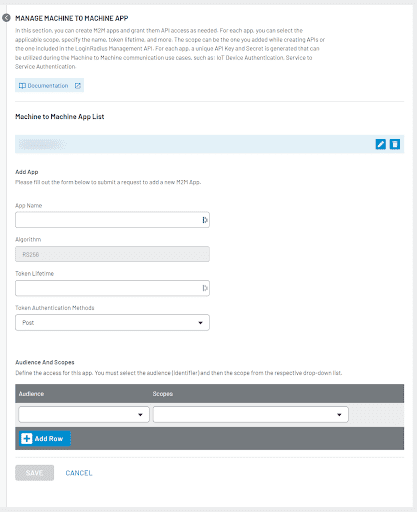
To start using the M2M Authorization for this scenario, you need to create an M2M App and define the desired scope of API(s), as explained here.

M2M Authorization: Authenticate Apps, APIs, and Web Services

Scenario 2: To grant desired access to your Business APIs.

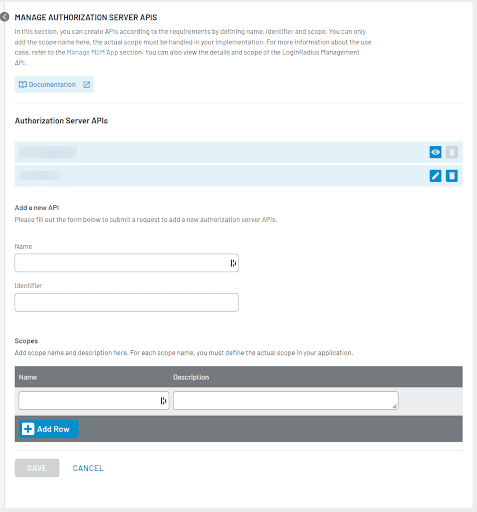
To start using the M2M Authorization for this scenario, you need to define your API in LoginRadius with name, identifier, and scope details and then create an M2M App with the desired scope of API(s), as explained here.

M2M Authorization: Authenticate Apps, APIs, and Web Services

In both scenarios, you get the Client Id and Client Secret for the created app, which you need to share with the partner or service who wants to access your APIs.

Client Credentials Grant Flow

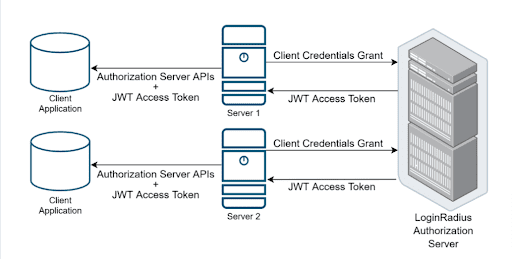
LoginRadius M2M Authorization uses client credentials grant flow from OAuth 2.0. In this flow, the client (depicted as Server 1 and Server 2 in the diagram below) holds Client ID and Client Secret and uses them to request an access token.

This grant-type flow occurs strictly between a client app and the authorization server. The user does not participate in this grant-type flow.

M2M Authorization: Authenticate Apps, APIs, and Web Services
  • The client (server) requests with the Client ID, Client Secret, Audience, and Claims to the authorization server.
  • If the request is valid, the authorization server sends a JWT access token to the client (server).
  • The client (server) uses the JWT access token to call LoginRadius Management or your APIs. APIs share data according to permissions given against the M2M app without using client Secret in this step.

Implement M2M Authorization with LoginRadius APIs

1. The client (partner, API, service, etc.) requests the access token using the following API:

API endpoint: https://api.loginradius.com/services/oauth/token

The following is an example request:

POST https://<LoginRadiusAppName>.hub.loginradius.com/service/oauth/token
Content-Type: application/json
{
  "audience": "https://api.loginradius.com/identity/v2/manage",
  "grant_type": "client_credentials",
  "client_id": "<YOUR_CLIENT_ID>",
  "client_secret": "<YOUR_CLIENT_SECRET>"
}

2. LoginRadius Authorization Server validates the request. Upon validation, it returns the JWT access token to the client.

The following is an example response with an access token:

{
  "access_token": "eyJz93a...k4laUWw",
  "token_type": "Bearer",
  "expires_in": 86400,
}

JWT Token Details
{
  "iss": "https://<LoginRadiusAppName>.hub.loginradius.com/",
  "sub": "<OAuth APPs APIKey>@client",
  "jti": "<unique Identifier>"
  "aud":"https://api.loginradius.com/identity/v2/manage",  //or https://service.example.com/api/v2
  "cid": "<APPConfig APIKey>",
  "sid": "<LR access Token>"  
  "exp": 1311281970,
  "iat": 1311281670,
  "scp": [
    "profile:read",
    "profile:create",
  ],
  "gty":"client_credentials"
}

3. The client can call APIs (as per the defined scope) using the JWT token. APIs will work based on permissions without the use of Client Secret.

curl --request GET \
  --url https://api.loginradius.com/identity/v2/manage/account/{uid} \
  --header 'authorization: Bearer eyJhb……….jVZ2w'
  --header 'X-LoginRadius-ApiKey: {apiKey}

4. The respective API(s) will work according to the scope or permission.

Implement M2M Authorization with Business APIs

1. The client (partner, API, service, etc.) requests the access token using the following API: API endpoint: https://bit.ly/3Ajzcnd

POST https://<LoginRadiusAppName>.hub.loginradius.com/service/oauth/token
Content-Type: application/json
{
"audience": "<business API endpoint>",
"grant_type": "client_credentials",
"client_id": "<YOUR_CLIENT_ID>",
"client_secret": "<YOUR_CLIENT_SECRET>"
}

Note: Where <LoginRadiusAppName> is the name of your LoginRadius App. In response, the client will get an access token.

2. Use the generated JWT token in the authorization for APIs.

curl --request GET \
--url < API URL > \
--header 'authorization: Bearer eyJh………VZ2w'

3. The client will get access to the information as per the defined scope.

LoginRadius M2M Authorization — Benefits

Overall, M2M Authorization offers secure access to improve business efficiency — and ultimately enhances user experience. In detail, the benefits include but are not limited to:

  • Secure data access across internal and external business systems
  • Granular data access with predefined scopes with minimal configuration
  • Efficient authentication and data exchange
  • Grant, limit, or block access permissions at any time

Conclusion

M2M Authorization is a secure and reliable method of autonomous interactions. It aids business systems in achieving greater efficiency and eliminates the need for human involvement. It also enables businesses to provide flexible machine-to-machine communication while enforcing granular access, authorization, and security requirements.


Originally Published at LoginRadius

M2M Authorization: Authenticate Apps, APIs, and Web Services | LoginRadius Blog
How can you ensure APIs, web services, and business systems communicate and access the information securely without human intervention? The answer is machine-to-machine (M2M) authorization.
M2M Authorization: Authenticate Apps, APIs, and Web Services

https://guptadeepak.com/content/images/2022/06/m2m-authorization-for-apis-apps-and-web-services.png
https://bit.ly/3QYTMiC


https://guptadeepak.com/content/images/2022/06/m2m-authorization-for-apis-apps-and-web-services.png
https://deepakguptaplus.wordpress.com/2022/07/01/m2m-authorization-authenticate-apps-apis-and-web-services/

Sunday, June 26, 2022

What Makes Zero Trust Better And Different From Traditional Security

What Makes Zero Trust Better And Different From Traditional Security

Enterprises have already started to embrace zero trust security over traditional security since it offers improved security while simultaneously improving flexibility and reducing complexity. Here’s how zero trust outperforms the traditional model:

Network access

Zero trust security enables users to connect with in-house applications securely. They can get these applications without exposing them to the internet or gaining network access.

On the other hand, traditional security uses the castle and moat concept (everyone inside the network is trusted by default). The user finds it difficult to access the applications from outside and is bound to trust everyone in the network. The problem here is that if a hacker poses as an insider, they get access to everything available within the network.

User identities

Zero trust security accepts no trust units before it awards the user admittance to anything. It also checks other forms of data before giving access to the client. In short, this security model pays heed to who the user is. So, it confirms the user’s identity every time the latter asks for security access.

Traditional security works on an entirely different principle as compared to zero trust. It gives value to where the user is coming from in the network. It utilizes the trust system because the client’s IP address or area characterizes the user identity in the system.

Modern techniques and technologies

Zero trust security tends to the concerns of cloud-facilitated data to re-examine a secure network plan. It solves these issues by accepting that everything is reliable. It grants trust only after the verification and authorization process.

However, traditional security lacks the modern techniques and technologies to monitor a network plan. The lack of these tools and services may compromise the system of the cloud-facilitated data, applications, and users.

What are the Benefits of Zero Trust Security?

Here is how zero trust benefits over traditional security:

  • It helps users gain better visibility across networks and enterprises.
  • It simplifies IT management through continual monitoring and analysis.
  • It enables the security system to work smarter by utilizing the central monitoring functions.
  • It ensures better data protection for networks, applications, and users.
  • It helps secure the remote workforce of an organization by considering identity as the perimeter.
  • It works on automation that enables the user to gain access to everything quickly.
  • It ensures continuous compliance with each access request through evaluation.

Final Thoughts

Zero trust security depends on the possibility that a business must have a default trust option for any element that crosses its border. It verifies anything that attempts to associate with or access the framework. A zero-trust network is different from regular VPNs and firewalls, as it secures access to all applications within an enterprise. Additionally, zero trust replaces traditional security technologies by offering better authentication methods.

So when it comes to taking digital transformation initiatives, proactive protection is required in this new decade. Therefore, a wise move for enterprises will be to implement zero-trust security.


Originally Published at Hackernoon

What Makes Zero Trust Better And Different From Traditional Security | HackerNoon
Traditional vs zero trust? Learn how zero trust outperforms the traditional model by delivering improved security, flexibility and reduced complexity.
What Makes Zero Trust Better And Different From Traditional Security

https://bit.ly/3xVwIbZ
https://bit.ly/3a0YZ8O


https://guptadeepak.com/content/images/2022/06/photo-1441804238730-210ce1c2cc00.webp
https://deepakguptaplus.wordpress.com/2022/06/26/what-makes-zero-trust-better-and-different-from-traditional-security/

Monday, June 13, 2022

Top 7 Google Drive Security Mistakes Companies Keep Making

Top 7 Google Drive Security Mistakes Companies Keep Making

You've likely had to work with a file stored on Google Drive at some point in your career. This can be a gift and a curse for you. Sharing essential documents, files, and applications is great for streamlining your workflow.

But, it may not be the most secure option available to you when it comes to account security. Google Drive is a file storage and synchronization service created by Google. Users can store files in the cloud, share files, and edit documents, spreadsheets, and presentations with collaborators.

It's no surprise why it's so popular: It's free, easy to use, and accessible anywhere. But did you know that hackers are targeting Google Drive users?

By password guessing, compromising weak passwords, or phishing campaigns, bad actors gain access to business documents such as intellectual property, financial records, and personally identifiable information (PII) stored on Google Drive.

There are a lot of factors at play when it comes to securing Google Drive's data. This means that security mistakes made near the source of the data like Google Drive tend to be repeated by other companies.

In this post, we'll be outlining seven Google Drive security mistakes that companies across industries are currently making.

Top 7 Google Drive Security Mistakes Companies Keep Making

Cloud data security is a critical consideration for companies moving to the cloud. But even as companies do more with Google Drive, many are still making mistakes that put their data at risk.

We've gathered the top seven Google Drive security mistakes companies make and how to avoid them.

The First Mistake: Using G Suite without Two-Step Verification

Two-step verification is your first line of defense against cyber threats. It works alongside your password to add an extra layer of account protection. You're alerted whenever someone attempts to sign in to your account from an unrecognized device or browser.

To protect users' accounts with two-step verification, go to the Google Admin console and select Security > Set up single sign-on (SSO) with a third party IDP > 2-Step Verification.

Ensure that every employee has enabled two-step verification in their accounts. The same risks apply when an employee accesses their work device or uses their work account on a personal device.

The best way to keep both business and personal accounts safe is for employees to turn on two-step verification for all the accounts they use on their devices.

Second Mistake: Google Files/Folders Should Be Shared Carefully:

If you use Google Drive for work, the chances are that you share some files with your colleagues. But what if you mistakenly share a file with the wrong person? Or does someone leaves your organization but still have access to sensitive documents?

You should frequently audit the shared documents and make it a policy that employees remove any files they no longer need access to. This will prevent any accidental data leakages.

Third Mistake: Not Using Google Vault

Google Vault is a tool that helps organizations manage, retain, search and audit their email, Google Drive files, and on-the-record chats.

It's an essential component of any security strategy, enabling you to detect and investigate the threats you face. If you're not already using Google Vault, find out how it works and start today.

Fourth Mistake: Not Protecting Your Data before Sharing It

The ability to easily share files is one of the benefits of Google Drive. But sharing can also be a security risk. By default, anyone with whom you share a file can edit it, comment on it or share it with others (including people outside your organization).

Take care when sharing files by setting appropriate permissions for each file and folder. For example, if you only want to allow viewing or commenting on a file, don't share it with "can edit" permissions. You can also protect files before transferring them by setting an expiration date or requiring a password to open them.

Fifth Mistake: Not Training Your Employees

Most employees don't understand the risks of using cloud services. Most don't realize that putting sensitive information in cloud services exposes you to more trouble than using an on-premises solution.

This is especially true of millennial employees, who have grown up with the internet and social media and are used to sharing photos, videos, and content online.

Sixth Mistake: Frequently Audit Shared Documents

Another mistake that companies make while using Google Drive is not auditing shared documents from time to time.

Google provides an easy-to-use interface that lets you see who has access to files and folders. You can easily see what type of permission each user has—whether they can only view or comment on a file or whether they can edit it as well.

It is imperative to audit shared documents from time to time because there are chances that some users might have left your company and are still able to access some sensitive documents stored on Google Drive.

Seventh Mistake: Google Drive Is Not For Sensitive File

This may seem obvious, but many people still don't get it. When you share a file through Google Drive, it's available for anyone with access to that drive to see it — even if you didn't intend for them to do so.

Even if you delete the file from your own Google Drive folder, it could still be accessible through another user's account if they downloaded a copy and saved it to their own Google Drive folder.

This means that confidential information could easily be leaked or stolen by an unauthorized person who has access to someone else's account or computer.

Bottom Line

Google Drive contains the stuff businesses hold most dear – their documents and data. But despite this, many companies are repeatedly making the same mistakes with their files. Each of the above errors is a common faux pas that every company should avoid to ensure that their business documents are protected as much as possible.

Google Drive's security benefit is an invaluable investment for companies that take their data security seriously. Successful implementation of Google Drive into a business requires strict security practices and strategies, including employee training on best practices for protecting files.

Given the massive amounts of files stored, this isn't an easy task, but that doesn't mean it isn't essential. Hopefully, these tips will help you keep your data safe. We hope that all companies will take these security measures seriously and act immediately so they do not become another victim of one of these situations.

So if you own a business or are a personal user who has sensitive information on your account, we urge you to start protecting your data by avoiding the mistakes above.

https://bit.ly/3xIH3sS
https://bit.ly/3aQijpt


https://guptadeepak.com/content/images/2022/04/AdobeStock_361331208_Editorial_Use_Only.jpeg
https://deepakguptaplus.wordpress.com/2022/06/13/top-7-google-drive-security-mistakes-companies-keep-making/

Monday, June 6, 2022

Should Artificial intelligence (AI) Be Regulated?

Should Artificial intelligence (AI) Be Regulated?

Artificial intelligence combines the elements of computer science and engineering to build intelligent computer programs that help solve global problems. AI works by classifying large volumes of data into actionable information through complex algorithms. Although some have argued that the application of AI is still at its infant stage, its application is already being seen across multiple sectors. For instance, in recent years, AI application has been witnessed in creating expert systems, speech recognition, natural language processing, and machine learning.

AI's potential application across multiple sectors has raised the demand for its use and brought great optimism regarding its ability to provide substantial improvements in working processes and possibly enhance human work. Its far-reaching application has fueled an explosion in its adoption across many sectors. For instance, in the health sector, experts have continued to test and apply various aspects of AI in the performance of administrative duties, documentation, patient monitoring, medical device automation, and image analysis.

Artificial Intelligence (AI) Regulation Debate

The surge in the adoption of AI has sparked heated debate regarding the correctness of introducing regulations that govern its use and application. Proponents of AI regulation have argued that, if unregulated, there was a high likelihood that AI could work against humanity instead of being applied for greater prosperity. One such proponent of regulation is Microsoft Chairman Bill Gates. He has been quoted raising concerns about "superintelligence" and expressing his lack of understanding about why others would not be concerned about the issue. Gates equated failing to regulate Artificial Intelligence to "Summoning the demon." Proponents across the spectrum have continuously made a case for the regulation of AI. There is no telling the lengths to which designers of these technologies could use anonymous data to drive their agenda or for their gain.

However, opponents of AI regulation have continued to call for the deregulation of AI, stating that it would be impossible to regulate all aspects of AI that affect human life. In their argument, they make a case that lawmakers have generally been unsuccessful, in the past, at regulating digital technologies. Opponents of AI regulation argue that a regulatory regime that aims to deal with all uses of Artificial Intelligence technology would be comprehensive in scope. In this regard, it would not make sense to apply the same regulatory regime in facial recognition software as to smart refrigerators, which make grocery orders based on consumer patterns. Instead, however, opponents of regulation propose a strategy whereby issues regarding the use of AI would be approached incrementally, and a regulatory framework adopted based on the issues of concern at that time.

Opponents of regulation have equally argued that regulating AI technologies could stifle growth hence reducing the prospects of it ever achieving its full potential.  AI technology experts such as Alex Loizou have actively opposed any form of regulation of AI before it can be fully understood. As a solution, he has called legislators first to give the technology time to flourish and evolve. All players have a good understanding of it before discussing ways of regulating it.

Emerging Issues regarding Unregulated AI

At the core of the debate on whether to regulate or not to regulate AI is that this technology relies on its large volumes of data. Proponents of regulation have argued that since data is not tangible property, it could be misused if it fell into the wrong hands. This data can interfere with individual privacy rights, database rights, copyright, and confidentiality rights in many ways. Already, there are several instances of AI applications gone awry, leading to severe violations against the victims.

According to an article by "The Guardian", the application of AI has not always yielded the desired outcomes. For instance, an overreliance on AI use in facial recognition systems led to more than 1,000 airline travelers flagging. In one case, an American Airline Pilot faced detention at least 80 times during his work since his name resembled that of a terrorist leader. In another instance, black contestants in a beauty contest were denied any win since the AI technology used to pick out winners had been trained predominantly on white women

Regulatory Response to Unregulated AI

The European Union is one such organization that has been quick to regulate AI use and its application to protect its member states from specific harmful AI-enabled practices. In its newest proposal, the European Union proposes to regulate the digital sector through the General Data Protection Regulation (the GDPR), the proposed Digital Services Act, and the proposed Data Governance Act. In the GDPR, the EU regulation introduces a four-tier system of risk to allow or prohibit the use of AI. AI regulation in the EU generally classifies AI systems as prohibited AI or Highly regulated AI. Regulation deems AI as Highly Regulated AI ("high-risk") if they pose a high risk to human beings' health and safety or fundamental rights.

Prohibited AI Systems are deemed as such if they contravene EU values or present an unacceptable risk to the fundamental rights of its citizens. It is noteworthy that the recommendations proposed in the regulation stem from the understanding that some algorithms deployed in AI applications have the potential to have direct consequences on people's lives and affect their decisions. For instance, AI is now being used to diagnose medical conditions, approve loans, select candidates for shortlisting, and recommend court penalties. In such cases, as in many other cases, the impact of AI use is enormous; hence this makes regulation imperative.

In regulating AI, the EU hopes to:

  • Establish, implement, document, and maintain a risk management system.
  • Establish transparency and information to end-users of AI technologies
  • Provide a framework for data management and governance
  • Ensure that AI systems undergo a conformity assessment procedure before releasing to the market.
  • Promptly correct issues regarding AI system non-compliance with existing AI regulation

Benefits of Regulating AI

It is perhaps not in doubt that regulation of AI creates a sense of confidence in the AI technologies being developed, perhaps because regulation helps safeguard and protect fundamental human rights. It is noteworthy that the use of AI has, in several instances, been seen to breach the rights of individuals on the grounds of race, religion, and sex. Regulation of AI is estimated to bring fairness and reason in the design of technologies that work towards improving the lives of human beings.

It is equally noteworthy that regulation helps ensure that infringements on fundamental human rights are kept at bay during the application of AI across sectors. For example, regulation may protect victims using the criminal justice system, making their sentencing solely based on machine learning. Regulation may, in this effect, help ensure that bad decisions made by machines are not used to deny defendants their fundamental rights. Regulation may also ensure that individuals are protected from unlawful detention based on a flawed facial recognition system. In the long-term, it is estimated that such frameworks will help create a platform for creating accountable AI systems that are above reproach and protect users and the general public from misuse or mishandling of their data to deny them their fundamental rights.

Should AI be Regulated or Not?

It is perhaps apparent that Artificial Intelligence technologies affect almost all spheres of our lives. AI use can improve our lives in ways that we never deemed possible through explaining the reasoning behind certain decisions or events, accurate prediction, and lessening human workload. However, it is equally noteworthy that the use of AI technologies can disrupt human existence and infringe on their fundamental rights. Thus, it is perhaps more reasonable to suggest that AI technologies be regulated to minimize risk to the fundamental human rights of all users. However, regulation should be approached in such a manner that makes sense and does not discourage using these technologies. In this regard, the law should create an enabling framework for responsible AI use that is conscious of the risks involved in applying AI technologies. In the long-term, it is anticipated that this approach will help safeguard both innovators engaged in the design and rollout of these technologies and their end-users.

https://bit.ly/3Q0rSSN
https://bit.ly/3Q5E70k


https://guptadeepak.com/content/images/2022/04/AdobeStock_318111476-1.jpeg
https://deepakguptaplus.wordpress.com/2022/06/06/should-artificial-intelligence-ai-be-regulated/

Monday, May 30, 2022

11 Tips for Keeping Information Safe on the Internet

11 Tips for Keeping Information Safe on the Internet

The internet brings with it a host of fun-filled activities and access to information that we could never have dreamt of just a decade ago. While the internet today is a wonderful resource, it is essential to remember that it can also be hazardous, especially if you have children who are "researching" while you are not watching.

There is no shortage of risks at home, at school, or at work. From inappropriate content to malicious sites and more, there are numerous risks. This blog will look at a few online safety tips to help you keep your personal details, private photos, and videos safe on the internet and off the internet, too.

Keep Personal Data Private and Limited

Potential employers or consumers do not require your personal or financial information. They must be aware of your skills and professional experience and how to contact you. You wouldn't dish out your personal details to strangers, so why give it out to countless, nameless people online?

Make Strong and Secure Passwords

When creating passwords, think of past phrases or figures that a malicious actor might easily decipher, such as your birthdate or your family members' names. Change the uppercase and lowercase letters, digits, and characters regularly.

For internet safety, it's also a good idea to generate distinct and strong passwords rather than using the same password on different sites – a password vault or password manager application can help maintain a record of this.

Be Cautious When Browsing Online

You wouldn't venture into a risky area in real life, so don't go online and visit unsecured websites. Identity thieves often utilize lurid information as bait. They realize netizens are occasionally attracted and curious about questionable content and may possibly lay their guard down when searching for it.

The underbelly of the internet is fraught with unknown dangers – a single thoughtless click could potentially reveal personal information and sensitive data or contaminate your gadget with viruses. You don't even offer the online predators a chance to gain access to your sensitive information if you resist the desire.

Two-Step Authentication is a Must

Large, reputable organizations such as PayPal, Facebook, Google, and others utilize two-step verification, requiring users to sign in using a code texted to their cellphones.

Other organizations may want your cellphone number or an alternate email account so that if they detect any suspicious activity or someone tries to access the account from other devices, you will receive a message requesting extra verification.

Be Wary of What You Share

The internet server doesn't have a true delete feature. Because eliminating the original doesn't really erase any copies generated by others, any comment or picture you post online may remain online indefinitely.

You can't "claim back" a comment you might regret posting or delete an awkward selfie you clicked at a party. To stay safe online, post nothing on the internet that you'd never want your mother or a future employer to see.

Use Prudence When Using Free Wi-Fi

No one ever said that a tad bit of online shopping was bad, or did someone? Any free public Wi-Fi network that you may use for making online purchases will have insufficient internet safety protections in place; other people on the same internet connection could readily see what you're doing.

Before pulling out your credit card, be sure you're at home, connected to a safe, password-protected virtual private network, and have antivirus software installed.

Examine Your Bank's and Creditor's Protection Measures

There is no such thing as universal internet safety and protection regarding online activities. If you shop online or do any business on the internet, ensure your bank or credit institutions have procedures designed to safeguard you in the event of online scams and identity theft. If your account has been hacked and exploited, you don't want to self-insure.

Furthermore, never enable your browser or web pages to remember your bank account information, for this is a sure-fire way to end up in trouble.

Take Caution When Meeting People Online

Individuals you connect with on social media platforms or meet online aren't always who they say they are. It's possible that they're not even real. Forged online accounts are a convenient method for hackers to snuggle up to naive internet users and empty their online wallets.

To prevent a data breach, maintain the same level of caution and common sense in your internet community life as in your offline social life.

Keep an Eye Out for Connections and Attachments

Online criminals and hackers are quite crafty. Their phishing scams are usually disguised as messages from an institution, power company, or other business. Specific characteristics, such as misspellings or an unusual email account, can indicate that the message is from malicious software.

Drive Wiping and Factory Reset

Frequently, just "deleting" anything from your computer or mobile device or clearing your browsing history does not result in the information being permanently removed from the gadget. When you resell or discard your old desktop computers or mobile devices, ensure the drives or cloud storage are thoroughly cleaned and the system is the factory reset.

Seek Information and Examine the Fine Print

Web browsers must understand that safeguarding personal information is a shared duty among themselves and their organizations. Customers should read and examine the security measures of the web pages to understand how and why the site/platform will utilize their personal information.

As a result, businesses should have well-documented privacy rules and standards in place and the ability to resolve any issues that arise correctly.

Bottom Line

As the internet has become a part of our daily lives, so have its insecurities. Safely Surfing the web and following healthy internet habits doesn't just mean being careful what you click. It means understanding how to protect your identity and ensure that your personal information online doesn't fall into the wrong hands.

Before signing off, the most important thing to remember is that, while the internet is a fantastic resource, it is not a substitute for real-life connections. So make sure to stay safe online and offline by being smart, using the internet safety tips mentioned above, and knowing how to get help if you need it.

https://bit.ly/3NFoB9y
https://bit.ly/3lYJWyQ


https://guptadeepak.com/content/images/2022/04/AdobeStock_303353368.jpeg
https://deepakguptaplus.wordpress.com/2022/05/30/11-tips-for-keeping-information-safe-on-the-internet/

Palo Alto Networks + CyberArk: The $25 Billion Deal Reshaping Cybersecurity

Deal Overview Transaction Details : Palo Alto Networks announced on July 30, 2025, its agreement to acquire CyberArk for $45.00 in cash ...